
Developers Portal
The Life Butler Developers Portal is where you configure everything when you integrate—similar to Apple App Store Connect. One place to manage your Butler app, credentials, permissions, and submissions.
Portal Features
The Developers Portal provides everything you need to build, test, and deploy your Butler integration:
- App registration – Register your Butler, set its name, description, and category.
- API credentials – Generate and manage API keys, client IDs, and secrets for your integration.
- Data scopes & permissions – Choose which data categories and scopes your Butler needs (financial, health, tasks, etc.).
- Webhooks & server config – Configure callback URLs and server-to-server settings for your backend.
- Butler Simulator – Test your Butler in a sandbox environment. Trigger events, simulate user interactions, inspect state, and debug responses in real-time before submission.
- Submission & review – Submit your Butler for review, track status, and publish to the Life Butler ecosystem.
Butler Simulator
The Butler Simulator is a powerful testing tool that lets you test your Butler integration in a sandbox environment. Configure your Butler's appearance, personality, and response speed, then simulate real-world events to see how your Butler responds.
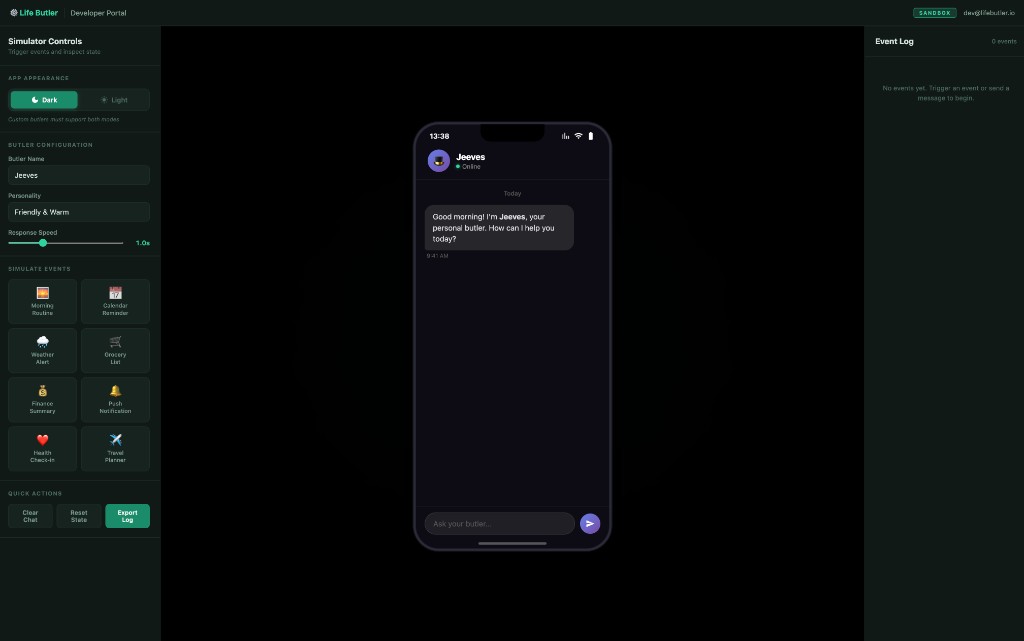
Simulator Controls
Toggle between dark and light modes, configure your Butler's name and personality, adjust response speed, and trigger various events like calendar reminders, weather alerts, and finance summaries.
Real-time Testing
Interact with your Butler through a mobile simulator interface. Send messages, view responses, and monitor the event log to track all interactions and state changes as you test.
Coming soon
The Developers Portal is in development. Until it launches, use the documentation on the Developers page and reach out via Contact for early access or API credentials.