
Developers
Build Butlers that integrate seamlessly with Life Butler. Your mini-app runs inside the platform; we handle data, auth, and persistence.
Developers Portal
When you integrate, you configure everything in our Developers Portal—similar to Apple App Store Connect. Register your Butler, manage API credentials, set permissions, and submit for review—all in one place.
Learn about the Developers Portal →Architecture (Mobile App)
Custom Butlers run inside the Life Butler mobile app in a WebView. All communication between the Butler and the host app goes through a JS Bridge. For API calls, Butlers use an event-driven architecture: they emit request events, and Butler Core handles the actual HTTP requests. Custom Butlers never make direct network connections; all API calls go through Butler Core, which provides centralized monitoring, rate limiting, and error handling.
Flow
- Custom Butler (WebView) – Third-party Butler UI and logic run in an in-app WebView (HTML/JS). No direct network or device APIs.
- JS Bridge – The only channel between the WebView and the app. The Butler calls bridge methods (e.g.
requestData,callAPI,getAuthToken); the app invokes JS in the WebView (e.g. events, responses). - Butler Core – Handles all API calls via an event-driven architecture. When a Butler needs to make an API call, it emits an
api.requestevent. Butler Core performs the actual HTTP request, applies rate limiting and authentication, implements retry logic, and emits anapi.responseevent back to the Butler. This centralizes monitoring and ensures consistent error handling. - Native App Layer – Handles auth, storage, and network infrastructure. Butler Core uses the native layer to perform HTTPS requests to external APIs and Life Butler backend.
- Life Butler Backend APIs – All server access from Custom Butlers is done through these APIs (data, auth, server-side actions). The mobile app is the only client that talks to the backend on behalf of the Butler.
- Third-Party Butler Server – A backend run by the Butler developer. It communicates with Life Butler’s backend over HTTPS (server-to-server) for webhooks, server-side logic, or syncing. All integration with Life Butler goes through our APIs; the third-party server does not talk directly to the mobile app.
Summary
| Concern | How it works |
|---|---|
| Where Butler runs | Inside the app, in a WebView (no standalone browser or direct network). |
| Butler ↔ App | JS Bridge only (bidirectional messages / RPC). |
| Network | Only through the mobile app; no direct sockets or fetch from the WebView. |
| API Calls | Butlers emit api.request events; Butler Core handles HTTP requests and emits api.response events. Provides centralized monitoring, rate limiting, and error handling. |
| Calling Life Butler Backend | Butler Core calls Life Butler Backend APIs through the native layer for data, auth, and server-side actions. |
| Third-party server | Developer’s backend talks to Life Butler Backend APIs over HTTPS (server-to-server). |
Event-Driven API Architecture
Butlers don’t make API calls directly. Instead, they emit events requesting API calls, and Butler Core handles the actual HTTP requests. This event-driven architecture provides better latency, centralized monitoring, rate limiting, and consistent error handling.
How It Works
- Butler emits request event – When your Butler needs to make an API call, it emits an
api.requestevent with the URL, method, headers, and body. The Butler never touches the network directly. - Butler Core handles HTTP – Butler Core listens for request events, performs the actual HTTP call, applies rate limiting, adds authentication headers, and implements retry logic with exponential backoff.
- Response event emitted – When the HTTP request completes, Butler Core emits an
api.responseevent with the response data, status code, and any errors. - Logging queued asynchronously – All API calls are logged via a queue that batches logs and sends them to the backend server. Logging doesn’t block the API response, ensuring low latency.
- Butler receives response – Your Butler receives the response event and processes the data. The SDK abstracts away the event system, so you use a simple API interface.
Benefits
| Benefit | Description |
|---|---|
| Better Latency | Logging happens asynchronously via a queue, so it doesn’t block API responses. Butlers get faster responses. |
| Centralized Monitoring | All API calls go through Butler Core, enabling centralized monitoring, logging, and analytics. |
| Rate Limiting | Global rate limiting prevents one Butler from overwhelming APIs, protecting all Butlers. |
| Consistent Error Handling | Retry logic, timeout handling, and error formatting are consistent across all Butlers. |
| Easy Feature Addition | Features like caching, request queuing, and authentication can be added centrally without modifying individual Butlers. |
SDK Interface
The Butler SDK abstracts away the event system. You use a simple, familiar API interface:
// In your Butler code
import { api } from '@lifebutler/sdk';

// Make an API call - SDK handles events internally
const response = await api.request({
  url: 'https://api.example.com/data',
  method: 'GET',
  headers: { 'Authorization': 'Bearer ...' }
});

// SDK automatically:
// - Emits request event
// - Waits for response event
// - Returns response data
// - Throws errors on failure
The SDK handles all event emission, response matching, and error handling. Your Butler code stays simple and focused on business logic.
Principles
Data ownership
All user data is owned and stored by Life Butler. Butlers are stateless and do not store user data. They request data from the main app via API. Users can export all their data at any time from the main app. Data portability is a core feature—users own their data, not the Butlers.
Data export
Users can export their complete data profile in standard formats (JSON, CSV, etc.). Export includes all data points, user profile, preferences, and history. Export is available from the main app; Butlers cannot prevent or restrict data export.
Security & privacy
Butlers operate in sandboxed environments. Data access is logged and auditable. Users can see what data each Butler accesses and revoke permissions or delete Butler data at any time. All data is encrypted at rest and in transit. Life Butler handles compliance (GDPR, CCPA, etc.).
Privacy architecture: One-way data flow
Life Butler follows a fundamental privacy principle: the server pulls data from third parties and users, performs all logic internally, and never directly provides user data to third parties. This means:
- Data flows IN: Life Butler pulls data from third-party services (banks, email, calendars) and users
- Processing is internal: All analytics, insights, and Butler logic run server-side within Life Butler
- Data flows OUT only to users: Processed results, insights, and exports go only to the user—never to third parties
- No data sharing: Your Butler receives data through Life Butler's APIs, but user data never flows from Life Butler to third parties
This architecture ensures user data stays within Life Butler's control, protecting privacy while enabling powerful Butler functionality. For complete details, see our Privacy Policy.
Core Features Your Butler Can Use
Life Butler provides core features that all Butlers can integrate with. These are built into the platform and accessible through the JS Bridge.
Tasks
Create custom tasks that appear in the user's unified task list. Tasks can be done within the day but no schedule is required. Tasks can have custom actions, completion criteria, and integration with other platform features.
Calendar
Create calendar entries for scheduled items. Calendar entries have specific dates and times, and appear in the user's unified calendar view alongside other scheduled events.
Alerts (Core Navigation)
Alerts is a core navigation tab (4th item in the main navbar: Home, Tasks, Calendar, Alerts). Alerts are urgent but don't have a schedule—they appear contextually when needed. All Butlers can create alerts through the Smart Alert Engine. Alerts appear in the unified Alerts interface where users can view, filter by Butler, and manage all their alerts in one place. Support for priorities (Low, Medium, High, Critical), action buttons, deep links, and custom metadata.
Learn about Alerts integration →Calendar
Create calendar entries (events) that appear in the user's calendar. Entries can be one-time or recurring, with custom metadata and actions.
Search Integration
Register your Butler as searchable in Core Butler. When users search, your Butler can return results with likelihood scores to help route queries.
Quick Actions
Register quick actions that appear in Core Butler's quick action menu and the Home Screen. Actions can be full-screen apps or lightweight decision/input sheets.
APIs
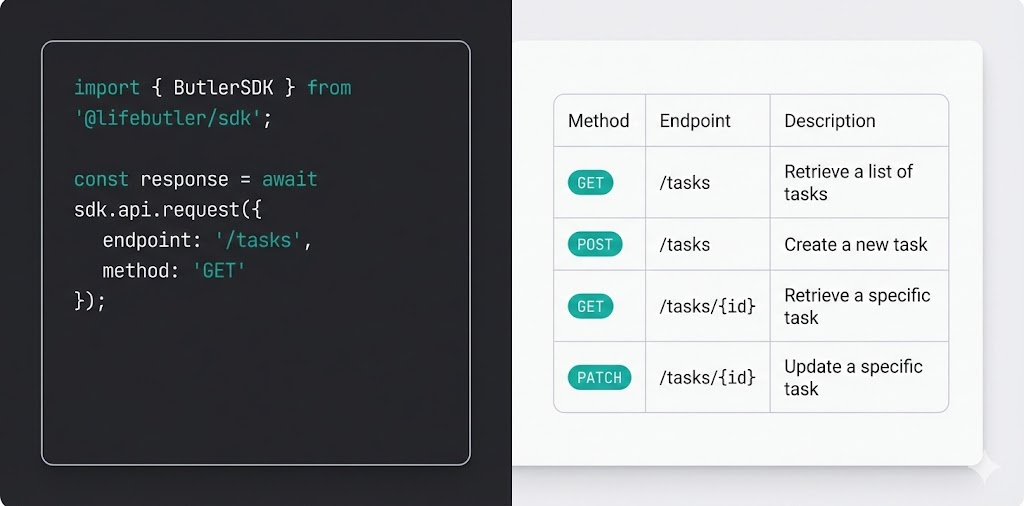
Butlers integrate via the Data Access API and follow a clear lifecycle. Full API reference and SDK docs are coming soon.
Data Access API
- RESTful or GraphQL interface
- Authentication via Life Butler tokens
- Permission-based access control and scopes
- Rate limiting and quotas
- Optional real-time subscriptions for updates
Butler lifecycle
- Butler registers with Life Butler
- Life Butler provides API credentials and data access scopes
- Butler requests data as needed (no local storage)
- Butler sends updates back to Life Butler
- Life Butler persists all changes
- Users can revoke access at any time
Data categories
Financial, Health, Education, Social, Documents, Tasks, Events. Data points use type-safe schemas per category, with timestamps, metadata, ownership, and version history.
UI guidelines
Butlers run inside the Life Butler shell. Follow these guidelines so your Butler feels native and consistent.
Layout & navigation
Your Butler is rendered inside a container controlled by Life Butler. Use the provided layout hooks for header, back navigation, and tab bar. Avoid full-screen takeovers unless necessary (e.g. onboarding). Support both compact and expanded viewports.
Theming & accessibility
Respect the user’s theme (light/dark) and system font size. Use semantic colors from the platform design tokens. Ensure sufficient contrast, focus indicators, and screen-reader labels. Butlers must be keyboard-navigable and work with reduced motion preferences.
Patterns & behavior
Use standard patterns for lists, forms, and empty states. Show clear loading and error states. Data mutations go through the Data API—never persist locally. Request only the scopes you need and explain why in your Butler’s permission screen.
Integration methods
Embedded screen: Your screen runs inside Life Butler; we control container, navigation, and data access. Stateless micro-app: Butlers are views/controllers—all reads and writes go through the Data API. Event-driven: Subscribe to data change events and react; automation rules live in the main app.
See Built-in Butlers on Home →