The Butler
Core orchestrator that every user has by default. Unified interface, navigation, and coordination of all specialized Butlers.
What it can do
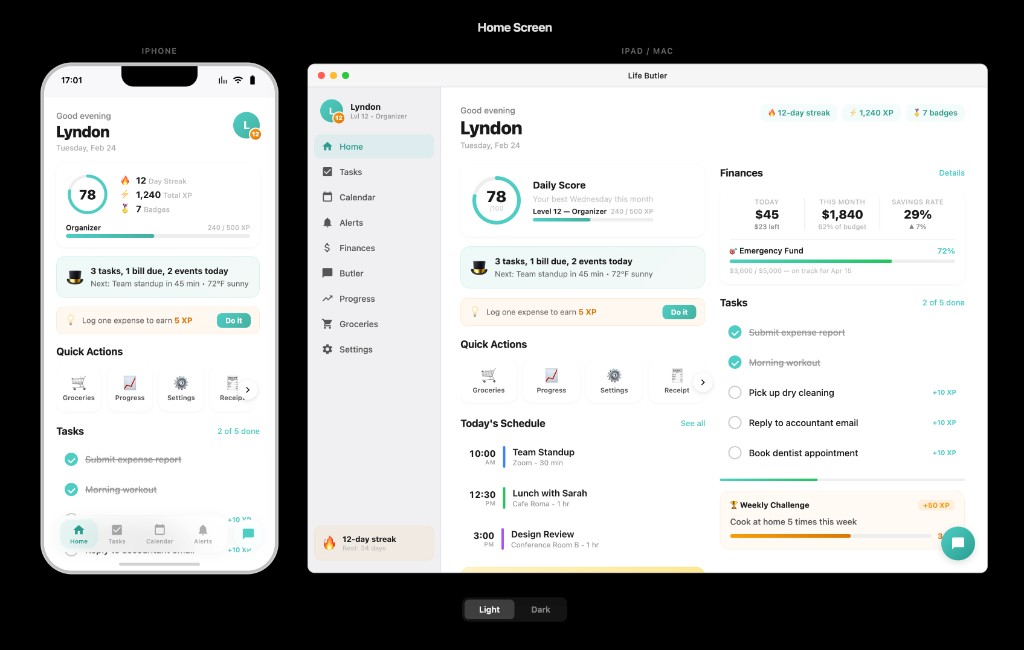
The Butler is the shell of Life Butler: it provides the main navigation, global search, and coordination between all your Butlers. Every user gets The Butler by default—it’s the home base from which you open Expense Tracker, Health Butler, Travel Butler, and the rest.
- Unified navigation: One place to see and jump to all your Butlers (built-in and custom).
- Global search: Search across Butlers and data categories without opening each app separately.
- Coordination: The Butler manages routing, deep links, and context so Butlers work together instead of in silos.
- Settings & profile: Account, preferences, data export, and Butler permissions live in the core experience.
- Action delegation: Route user actions (e.g. “log expense”, “add to list”) to the right Butler. The Butler resolves intents and hands off to the appropriate Butler so one tap or command does the right thing.
- Navbar configuration: Control the shell’s top bar and tab bar per context. Butlers can request titles, back behavior, and primary actions so the navigation feels native to each screen.
- Theme & appearance management: The Butler provides a standardized appearance API that all Butlers must use. Centralized theme management (light/dark mode), design tokens, and color schemes ensure visual consistency across the platform. Butlers receive theme information and must respect user preferences for a native, cohesive experience.
- Data request: Butlers request data through The Butler instead of storing it themselves. The shell brokers Data API calls, enforces permissions, and returns only what each Butler is allowed to see.
- Event pipeline: A central event bus for cross-Butler updates. When one Butler changes data (e.g. new expense, new reminder), others can subscribe and react—enabling automation and consistent state without tight coupling.
- Alerts (Core Navigation): Alerts is a core navigation tab (4th item in the main navbar: Home, Tasks, Calendar, Alerts). Alerts are urgent but don't have a schedule—they appear contextually when needed. The Butler centralizes all alerts from all Butlers in one unified interface. All Butlers can create alerts through the Smart Alert Engine, and users can view, filter, and manage them all from the Alerts tab. Push and in-app alerts with user-controlled preferences per Butler and category.
- Listen for instructions: The Butler can listen to you for voice instructions. Say what you want (e.g. “log an expense”, “add milk to the list”) and The Butler routes it to the right Butler via action delegation—hands-free when you need it.
Why it matters
Without a central orchestrator, Life Butler would be a loose set of mini-apps. The Butler ties them into one coherent product: your data stays in one platform, navigation is consistent, and third-party Butlers plug in the same way as built-in ones.