
Writing More Secure Code with LLMs: Security Practices and Guardrails
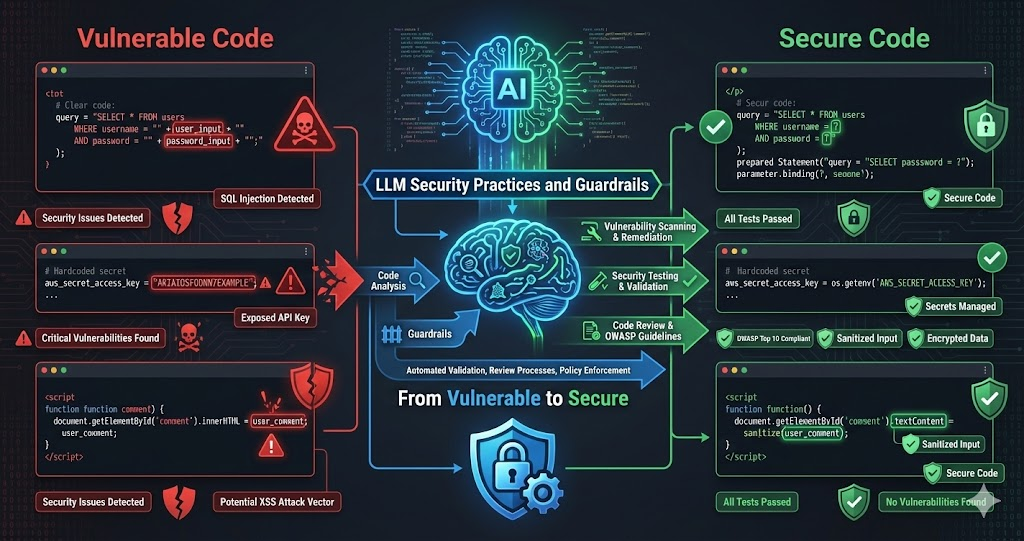
LLMs are powerful tools for writing code, but they can introduce security vulnerabilities just as easily as they can help prevent them. The key is using LLMs intentionally for security — not just accepting whatever code they generate, but actively using them to identify vulnerabilities, write secure code, and validate security.
We’ve developed practices for writing more secure code with LLMs: security-focused prompts, vulnerability detection, security testing, and code review practices. These practices don’t just prevent vulnerabilities — they make security a first-class concern throughout the development process.
LLMs don’t automatically write secure code. But when used intentionally with security-focused practices, they can help identify vulnerabilities, write more secure code, and validate security through testing and review.
The Security Challenge with LLMs
LLMs generate code that looks correct and works, but may contain hidden security vulnerabilities:
Common Vulnerabilities
LLMs often generate code with SQL injection risks, XSS vulnerabilities, insecure authentication, missing input validation, hardcoded secrets, and other common security issues. They write code that works, not necessarily code that’s secure.
Lack of Security Context
LLMs don’t inherently understand security implications. They generate code based on patterns — which may include insecure patterns from training data. They need explicit security guidance.
False Sense of Security
When LLMs generate code that works, it’s easy to assume it’s secure. But working code isn’t necessarily secure code. Security requires explicit attention and validation.
Security-Focused Prompts
The first step: use security-focused prompts. Don’t just ask for functionality — ask for secure functionality:
Example: Secure API Endpoint
Generic Prompt (Insecure)
"Create an API endpoint that accepts a user ID
and returns their profile data."
This might generate code with no authentication, no input validation, SQL injection vulnerabilities, or authorization checks.
Security-Focused Prompt
"Create a secure API endpoint that:
1. Requires authentication (JWT token)
2. Validates and sanitizes the user ID input
3. Checks authorization (user can only access their own data)
4. Uses parameterized queries (no SQL injection)
5. Returns appropriate error messages (no info leakage)
6. Implements rate limiting
7. Logs security events"
This prompt explicitly requests security features, guiding the LLM toward secure code.
Security Prompt Patterns
Explicit Security Requirements
List security requirements explicitly: authentication, authorization, input validation, output encoding, error handling. Don't assume the LLM will include them.
- Specify auth method (JWT, OAuth, session-based)
- Define authorization rules and role checks
- List all inputs that need validation
- Require specific error handling approaches
Reference Security Standards
Reference OWASP Top 10, CWE Top 25, or other standards. 'Follow OWASP guidelines' is more effective than 'validate input.'
- OWASP Top 10 covers the most critical web risks
- CWE Top 25 lists most dangerous software weaknesses
- Industry-specific standards (PCI DSS, HIPAA) when relevant
- Framework-specific security best practices
Ask for Security Considerations
Explicitly ask: 'What security considerations should be addressed?' or 'What vulnerabilities could this code have?' LLMs can identify issues when asked directly.
- Threat modeling for the specific use case
- Attack surface analysis of the feature
- Data flow security implications
- Third-party integration risks
Request Security Testing
Ask LLM to write security tests: 'Write tests that verify authentication, authorization, input validation, and error handling.'
- Tests document and verify security requirements
- Regression tests prevent security backsliding
- Edge case tests cover attack scenarios
- Integration tests verify end-to-end security
Using LLMs for Vulnerability Detection
LLMs can identify security vulnerabilities in existing code when asked explicitly. Use them as security reviewers:
Security Code Review
Ask LLM to review for SQL injection, XSS, auth bypass, authorization flaws, and other OWASP Top 10 vulnerabilities. LLMs identify common vulnerabilities effectively.
Threat Modeling
Ask: “What are the security threats to this feature? What could an attacker do?” LLMs help think through attack vectors and potential vulnerabilities.
Security Pattern Matching
LLMs recognize insecure patterns from training data. Ask: “Does this code follow secure coding practices? Are there security anti-patterns?” They can identify common mistakes quickly.
Example: Vulnerability Detection Prompt
Security Review Prompt
"Review this code for security vulnerabilities:

1. Check for OWASP Top 10 vulnerabilities
2. Identify authentication/authorization issues
3. Find input validation problems
4. Detect SQL injection, XSS, CSRF risks
5. Check for hardcoded secrets or sensitive data
6. Identify insecure error handling
7. Review for insecure dependencies

For each issue found, explain:
- What the vulnerability is
- Why it's a security risk
- How to fix it
- Provide secure code example"
Security Testing with LLMs
Use LLMs to write security tests. Security tests verify that security controls work and document expected security behavior:
Types of Security Tests
Authentication Tests
Test that authentication is required and enforced: tokens validated, expired tokens rejected, invalid tokens rejected.
Authorization Tests
Test that users can only access authorized resources, role-based access works, privilege escalation is prevented.
Input Validation Tests
Test that malicious input is rejected: SQL injection attempts fail, XSS payloads sanitized, input length limits enforced.
Error Handling Tests
Test that error messages don’t leak sensitive information, stack traces aren’t exposed, errors logged appropriately.
Example: Security Test Generation
Security Test Prompt
"Write security tests for this API endpoint:

1. Authentication tests:
   - Unauthenticated requests are rejected
   - Invalid tokens are rejected
   - Expired tokens are rejected

2. Authorization tests:
   - Users can only access their own data
   - Admin-only endpoints reject regular users

3. Input validation tests:
   - SQL injection attempts are blocked
   - XSS payloads are sanitized
   - Invalid input formats are rejected

4. Error handling tests:
   - Error messages don't leak sensitive info
   - Stack traces aren't exposed to users"
Security Code Review Practices
Don’t just accept LLM-generated code. Review it for security, using LLMs to help with the review:
Review All LLM-Generated Code
Never deploy LLM-generated code without review. Always review for security, even if the code looks correct. LLMs make mistakes, and security mistakes are costly.
- Security review before every merge to main
- Check for OWASP Top 10 in generated code
- Verify that security controls are actually implemented
- Don't trust code comments — verify the actual logic
Use LLMs for Security Review
Ask LLM to review code for security issues. Use a different LLM or a fresh conversation to get a second opinion. Multiple reviews catch more issues.
- Different LLMs catch different vulnerability patterns
- Fresh context prevents blind spots from generation session
- Cross-validate findings between models
- Combine LLM reviews with manual expert review
Check Security Dependencies
Review dependencies for known vulnerabilities. Ask: 'Are there any known security vulnerabilities in these dependencies?' Check against vulnerability databases.
- Run npm audit, pip audit, or equivalent tools
- Check CVE databases for known issues
- Verify dependency versions are actively maintained
- Minimize dependency surface area
Verify Security Controls
Verify that security controls are actually implemented, not just mentioned. Check that authentication is enforced, authorization is checked, input is validated.
- Trace auth checks through the entire request path
- Test authorization with different user roles
- Verify input validation rejects malicious payloads
- Confirm error responses don't leak internal details
Security Patterns and Libraries
Use LLMs to identify and implement secure patterns and well-maintained libraries:
Secure Libraries
Ask: “What are secure libraries for authentication, encryption, input validation?” LLMs recommend well-maintained, battle-tested libraries instead of custom security code.
Security Patterns
Ask: “What are secure patterns for [use case]?” LLMs suggest established patterns: parameterized queries, output encoding, secure session management.
Avoid Insecure Patterns
Ask: “What insecure patterns should be avoided?” LLMs identify anti-patterns: string concatenation for SQL, eval() for user input, storing passwords in plaintext, using MD5/SHA1 for password hashing.
Real Scenario: Building Secure Authentication
Here’s how we used LLMs to build secure authentication — a multi-pass approach that catches issues iteratively:
Security-Focused Prompt
Asked LLM: 'Create a secure authentication system that uses bcrypt, JWT, rate limiting, input validation, and follows OWASP authentication guidelines.'
- Explicit security requirements in the initial prompt
- Referenced OWASP authentication guidelines
- Specified bcrypt for password hashing, JWT for tokens
- Required rate limiting and security event logging
Code Generation & Initial Review
LLM generated authentication code with bcrypt, JWT, input validation, error handling. Code looked correct and included security features.
- Generated code included all requested security features
- Used established libraries (bcrypt, jsonwebtoken)
- Implemented middleware for auth checks
- Added input sanitization on all endpoints
Security Review & Issues Found
Asked LLM to review for timing attacks, token expiration issues, password policy enforcement, session management problems.
- Missing password complexity requirements
- No account lockout after failed attempts
- JWT expiration not validated properly
- Potential timing attack on username lookup
Fixes & Security Tests
Asked LLM to fix all issues and write comprehensive security tests verifying every control.
- Added password complexity validation (min length, mixed chars)
- Implemented account lockout after 5 failed attempts
- Used constant-time comparison for username lookup
- Generated 25+ security-focused test cases
This multi-pass process — security-focused prompt, code generation, security review, fixes, security tests — ensures secure code, not just working code.
Security Checklist for LLM-Generated Code
Use this checklist when reviewing LLM-generated code — every item is a potential vulnerability if missed:
Auth & Authorization
Authentication required and enforced. Authorization checked. Tokens validated. Privilege escalation prevented.
Input Validation
All input validated and sanitized. Parameterized queries used. XSS prevented. Input length limits enforced.
Secrets & Data
No hardcoded secrets. Passwords hashed. Sensitive data encrypted. Secrets in env vars or secret managers.
Error Handling
Errors don’t leak sensitive info. No stack traces exposed. Generic messages for users, detailed logs for admins.
Dependencies
Dependencies up to date with no known vulnerabilities. Only necessary deps included. From trusted sources.
Security Controls
Rate limiting, CSRF protection, HTTPS enforced. Security headers set. Security logging implemented.
Continuous Security Practices
Security isn’t a one-time check — it’s continuous. Integrate security into your workflow:
Security in Every Prompt
Always include security requirements in prompts. Don't add security as an afterthought — make it part of the initial request.
- Security requirements listed before functional requirements
- Reference applicable security standards
- Request secure patterns and libraries by default
- Ask for security implications of design choices
Security Tests in Every Feature
Write security tests for every feature. Security tests verify controls work and document expected security behavior.
- Auth/authz tests for every endpoint
- Input validation tests with known attack payloads
- Error handling tests confirm no info leakage
- Run security tests in CI/CD pipeline
Regular Security Reviews
Regularly review code for security issues. Combine LLM reviews with manual reviews and security tools.
- Schedule periodic security review sprints
- Use SAST and DAST tools alongside LLM reviews
- Track security findings and remediation status
- Share learnings across the team
Security Updates
Keep dependencies updated, monitor for advisories, apply patches promptly. Use LLMs to identify outdated dependencies.
- Automated dependency update monitoring
- Security advisory subscriptions for key dependencies
- Regular patch cycles with security prioritization
- Emergency response process for critical CVEs
The Constant: Security as a First-Class Concern
Every benefit of LLMs for security stems from one principle: make security explicit, not implicit. LLMs don’t automatically write secure code — but when you explicitly request security in prompts, ask for vulnerability reviews, write security tests, and verify controls, they become a powerful force multiplier for building secure systems.
Limitations and Best Practices
LLMs are helpful for security, but understanding the boundaries is essential:
Not a Replacement for Experts
LLMs identify common vulnerabilities, but don’t replace security experts. Complex issues, novel attacks, and security architecture require human expertise.
Verify LLM Advice
Don’t blindly trust LLM security advice. Verify against security standards and expert guidance. LLMs can suggest insecure solutions.
Use Security Tools Too
Combine LLM reviews with static analysis, dependency scanners, penetration testing. LLMs complement tools, not replace them.
Stay Updated on Threats
Security threats evolve. LLMs are trained on past data. Stay updated on current threats, new attack vectors, and emerging vulnerabilities.
Conclusion
LLMs can help write more secure code, but only when used intentionally with security-focused practices. Use security-focused prompts, ask LLMs to identify vulnerabilities, write security tests, and review code for security issues.
The key is making security a first-class concern throughout the development process. Don’t just ask for functionality — ask for secure functionality. Don’t just write tests — write security tests. Don’t just review code — review code for security.
Security isn’t something you add at the end — it’s something you build in from the start. Use LLMs intentionally for security: security-focused prompts, vulnerability detection, security testing, and code review. Make security a first-class concern, and LLMs can help you write more secure code.
If you’re using LLMs to write code, make security part of your workflow. Use security-focused prompts. Ask LLMs to identify vulnerabilities. Write security tests. Review code for security. The result will be more secure code, not just working code.