
Reorganizing Workflows for LLMs: Modular Projects, LLM-Friendly Docs, and Test Guardrails
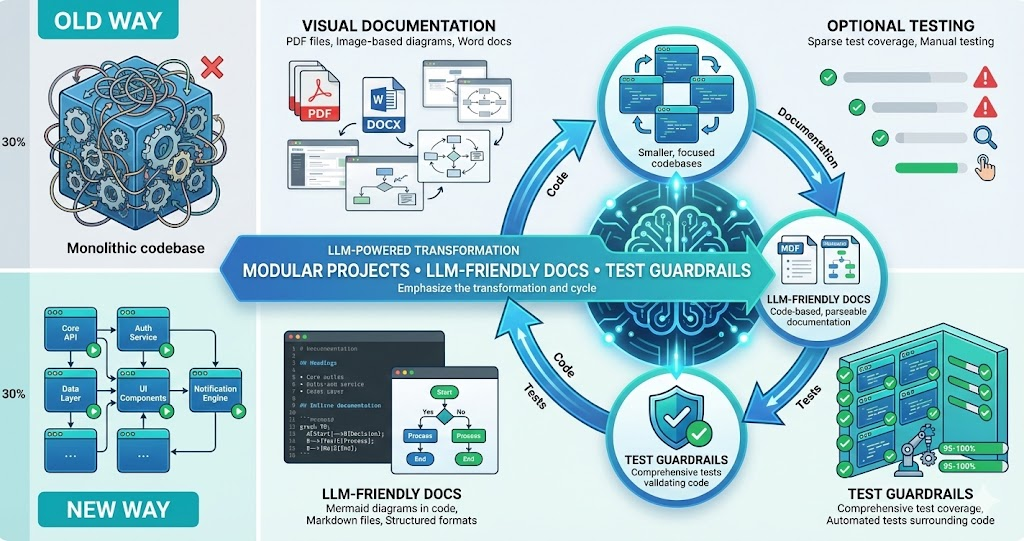
LLMs are powerful tools, but they work best when we structure our work to match how they operate. We can’t just use LLMs with our existing workflows — we need to reorganize how we work to make LLMs more effective.
Over time, we’ve made three key changes: modular projects that can run locally, LLM-friendly documentation with code-based diagrams, and tests in all code as guardrails. These changes don’t just help LLMs — they make our entire development process better.
LLMs need context they can understand, code they can run, and feedback they can act on. We restructured our workflows to provide all three: modular projects, code-based documentation, and comprehensive tests.
The Three Key Changes
Modular Projects That Run Locally
Break projects into independent modules that can run standalone. Each module has its own dependencies, can be tested in isolation, and doesn’t require complex infrastructure.
LLM-Friendly Documentation
Write documentation in formats LLMs can parse: Markdown with code-based diagrams (Mermaid), inline code examples, structured formats. Avoid images, PDFs, or visual-only formats.
Tests as Guardrails
Write tests for all code. Tests serve as guardrails for LLMs: they can verify their changes work, catch regressions, and understand expected behavior. Tests also document how code should work, providing context for LLMs.
Modular Projects That Run Locally
The first change: break monolithic projects into modular, independent components that can run locally without complex infrastructure.
Why Modular?
LLMs struggle with large codebases. When a project has thousands of files, complex dependencies, and requires cloud infrastructure to run, LLMs can’t effectively understand or modify it. They get lost in the complexity.
Smaller Context Windows
Modular projects fit better in LLM context windows. An LLM can understand a 50-file module completely, but struggles with a 500-file monolith.
Independent Testing
Each module can be tested in isolation. LLMs can run tests locally, verify changes work, and iterate quickly. No need to deploy to staging or wait for CI/CD pipelines.
Clear Boundaries
Modules have clear interfaces and responsibilities. LLMs can understand what a module does, what it depends on, and how to modify it without breaking other parts of the system.
What We Changed
We restructured our codebase into independent modules:
Before: Monolithic Structure
life-butler/
  ├── src/
  │   ├── butlers/
  │   ├── core/
  │   ├── api/
  │   ├── database/
  │   └── frontend/
  ├── package.json (huge, all dependencies)
  └── Requires: Docker, databases, cloud services
After: Modular Structure
life-butler/
  ├── butlers/
  │   ├── task-butler/ (runs standalone)
  │   ├── calendar-butler/ (runs standalone)
  │   └── weather-butler/ (runs standalone)
  ├── core/
  │   └── butler-core/ (runs standalone)
  ├── sdk/
  │   └── butler-sdk/ (runs standalone)
  └── Each module:
      - Own package.json
      - Own tests
      - Can run locally
      - Clear dependencies
Benefits
LLMs Can Understand Entire Modules
An LLM can read all files in a module, understand the complete context, and make informed changes. No more 'I can only see part of the codebase' limitations.
- Full module fits within context window for comprehensive understanding
- All dependencies and interfaces visible at once
- LLM can reason about side effects across the entire module
Fast Local Testing
LLMs can run tests locally, see results immediately, and iterate. No waiting for CI/CD, no deploying to staging. Instant feedback loop.
- Test results in seconds, not minutes or hours
- Rapid iteration cycles for fixes and improvements
- No external infrastructure required to verify changes
Clear Dependencies
Each module declares its dependencies clearly. LLMs can understand what's needed, what's optional, and how modules connect.
- Explicit package.json with only required dependencies
- No hidden dependencies or implicit requirements
- Clear API contracts between modules
LLM-Friendly Documentation
The second change: write documentation in formats LLMs can parse and understand. This means code-based diagrams, structured formats, and avoiding visual-only content.
Why Code-Based Diagrams?
Traditional documentation uses images, PDFs, and visual diagrams. LLMs can’t effectively parse these — they can’t read the text in images, understand diagram relationships, or extract structured information from visual formats.
Mermaid Diagrams in Code
Use Mermaid for all diagrams: architecture, flowcharts, sequence diagrams, ER diagrams. Mermaid is code-based, so LLMs can read it, understand relationships, and generate new diagrams.
Markdown with Code Examples
Write documentation in Markdown with inline code examples. LLMs can parse Markdown, understand code snippets, and extract structured information. No PDFs, no Word docs, no images with text.
Structured Formats
Use structured formats: YAML for configs, JSON for schemas, TypeScript types for APIs. LLMs can parse these formats, validate them, and generate code from them.
What We Changed
We moved all documentation to LLM-friendly formats:
Before: Visual Documentation
• Architecture diagrams in Figma/Visio (images)
• Flowcharts as PNG files
• API docs in PDF format
• Requirements in Word documents
• LLMs can’t parse any of this
After: Code-Based Documentation
• Architecture diagrams in Mermaid (code)
• Flowcharts as Mermaid diagrams
• API docs in Markdown with TypeScript types
• Requirements in Markdown with structured sections
• LLMs can read, parse, and generate all of this
Example: Mermaid Architecture Diagram
Here’s how we document architecture now:
Architecture Documentation (Mermaid)
```mermaid
graph TB
    User[User] -->|Request| Butler[Butler]
    Butler -->|Event| Core[Butler Core]
    Core -->|HTTP| API[External API]
    API -->|Response| Core
    Core -->|Event| Butler
    Butler -->|Response| User
```
LLMs can read this, understand the flow, and even generate code that matches the architecture.
Benefits
LLMs Can Parse It
LLMs can read diagrams as code, understand relationships between components, and extract structured information from documentation.
LLMs Can Generate It
LLMs can generate new diagrams, update existing diagrams when code changes, and validate diagrams against the actual codebase.
Tests as Guardrails
The third change: write tests for all code. Tests serve multiple purposes: they verify correctness, catch regressions, document expected behavior, and provide guardrails for LLMs.
Why Tests Are Guardrails
LLMs make mistakes. They generate code that looks right but doesn’t work, or code that works but breaks existing functionality. Tests catch these mistakes immediately.
Immediate Feedback
LLMs can run tests after making changes. If tests fail, they know something is wrong and can fix it. No waiting for manual testing — instant feedback loop.
Document Expected Behavior
Tests document how code should work. LLMs can read tests to understand expected behavior, edge cases, and error handling. Tests are executable documentation.
Prevent Regressions
When LLMs modify code, tests catch if they break existing functionality. Tests prevent “it worked before, but now it doesn’t” scenarios.
Guide Implementation
Writing tests first (TDD) guides LLMs toward correct implementations. Tests define the interface, expected behavior, and edge cases before implementation starts.
What We Changed
We made testing mandatory and comprehensive:
Before: Optional Testing
• Tests written sometimes, not always
• No tests for utilities or helpers
• Integration tests only for critical paths
• LLMs had no way to verify changes
After: Comprehensive Testing
• Tests for all code, no exceptions
• Unit tests for every function
• Integration tests for all modules
• LLMs run tests after every change
Example: Test-Driven Development with LLMs
Here’s how we work with LLMs and tests:
Write Test First
Ask LLM to write a test for the desired functionality. Test defines expected behavior, edge cases, error handling.
- Test captures the precise interface and expected outputs
- Edge cases documented upfront before implementation
- Error scenarios defined as part of requirements
Run Test (Fails)
Run the test — it fails because implementation doesn't exist yet. This confirms the test is correct and meaningful.
- Failing test validates that the test itself is accurate
- Confirms the functionality is not yet implemented
- Establishes a clear baseline to measure progress
Implement Feature
Ask LLM to implement the feature to make the test pass. LLM has clear guidance from the test about what to build.
- LLM uses test as a specification for implementation
- Implementation guided by explicit expected behavior
- Reduces ambiguity and incorrect assumptions
Run Test (Passes)
Run the test again — it passes. LLM has successfully implemented the feature. All existing tests still pass (no regressions).
- Passing test confirms correct implementation
- Existing tests verify no regressions introduced
- Feature is verified both functionally and structurally
Real Scenario: Refactoring with LLMs
Here’s a real scenario showing how these changes helped us work with LLMs — a multi-step refactoring that would have taken days, completed in hours:
Context
We needed to refactor an API client module to add retry logic and better error handling. The module was part of a larger monolith, had no tests, and documentation was in a PDF.
- API client deeply embedded in monolithic codebase
- No test coverage for existing functionality
- Documentation only available as non-parseable PDF
- Required cloud deployment to test any changes
Modular Project
API client was extracted into its own module. LLM could read all files and understand the complete context because the module was small enough.
- Extracted module with clear boundaries and interfaces
- All files visible within a single LLM context window
- Own package.json with explicit dependencies
LLM-Friendly Docs
Documentation rewritten in Markdown with Mermaid diagrams. LLM could parse architecture and understand requirements without visual-only content.
- Architecture diagrams converted to Mermaid code
- API contracts documented as TypeScript interfaces
- Requirements structured in parseable Markdown sections
Tests as Guardrails
Comprehensive test suite created. LLM could run tests after each change, verify correctness, catch regressions, and iterate quickly on local machine.
- Unit tests for every function in the module
- Integration tests for API client retry logic
- All tests runnable locally in seconds
Successful Refactoring
LLM successfully refactored the module in hours instead of days. All tests passed, no regressions, code was cleaner and more maintainable.
- Refactoring completed in hours, not days
- All tests passed with zero regressions
- Combination of modular structure, parseable docs, and tests made it possible
Additional Workflow Adjustments
Beyond the three key changes, we made additional adjustments to our workflow:
1. Code Organization
Flat File Structures
Avoid deeply nested directories. LLMs struggle with complex folder hierarchies. Prefer flat structures with clear naming conventions.
Single Responsibility Files
Each file should have one clear purpose. LLMs can understand single-purpose files better than multi-purpose files. Smaller, focused files are easier to modify.
Consistent Naming Conventions
Use consistent naming across the codebase. LLMs can infer patterns and generate code that matches existing conventions. Inconsistent naming confuses LLMs.
2. Documentation Standards
Inline Documentation
Document code inline with comments and JSDoc. LLMs can read inline docs while reading code, providing context without switching files.
README Files in Every Module
Every module has a README explaining what it does, how to run it, dependencies, and examples. LLMs can read READMEs to understand modules quickly.
Changelog for All Changes
Maintain changelogs in Markdown. LLMs can read changelogs to understand what changed, why, and when. Helps LLMs understand the evolution of code.
3. Development Environment
One-Command Setup
Each module can be set up with a single command: npm install && npm test. LLMs can verify setup works, run tests, and start working immediately.
No External Dependencies for Testing
Tests don’t require databases, APIs, or external services. Use mocks and fixtures. LLMs can run tests without complex infrastructure setup.
Fast Test Execution
Tests run quickly — seconds, not minutes. LLMs can iterate rapidly, running tests after each change. Slow tests break the feedback loop.
4. Version Control
Small, Focused Commits
Make small commits with clear messages. LLMs can understand commit history, see what changed, and generate appropriate commit messages.
Branch Naming Conventions
Use consistent branch naming. LLMs can understand branch purposes and generate appropriate branch names for new features.
PR Descriptions in Markdown
Write PR descriptions in Markdown with code examples and Mermaid diagrams. LLMs can read PRs to understand changes and provide feedback.
The Workflow Cycle: How Steps Feed Into Each Other
These changes create a feedback cycle where each step feeds into the next:
LLM Reads Documentation
LLM reads Markdown docs with Mermaid diagrams. Understands architecture, requirements, expected behavior. Gets context for what needs to be built.
- Parses structured documentation formats (Markdown, YAML, TypeScript)
- Reads Mermaid diagrams to understand system architecture
- Builds mental model of requirements and constraints
LLM Reads Code in Module
LLM reads all files in the modular project. Understands complete context because module is small enough to fit in context window.
- Entire module visible within a single context window
- Sees existing patterns, conventions, and code structure
- Identifies dependencies and interfaces between components
LLM Reads Tests
LLM reads test files to understand expected behavior, edge cases, error handling. Tests serve as executable documentation.
- Tests define precisely how code should behave
- Edge cases documented as explicit test scenarios
- Error handling expectations captured in test assertions
LLM Generates Code
LLM generates code based on documentation, existing code patterns, and test requirements. Code follows conventions, matches architecture.
- Code matches documented architecture and patterns
- Implementation satisfies test requirements
- Follows conventions observed in existing codebase
Tests Run Locally
Tests run immediately on local machine. Fast feedback — seconds, not minutes. LLM sees results right away, can iterate quickly.
- Instant feedback loop with local test execution
- No deployment or CI/CD wait times
- LLM can iterate multiple times in rapid succession
Feedback Loop
If tests fail, LLM sees error messages, fixes code, runs tests again. If tests pass, LLM updates documentation if needed, then moves to next task.
- Error messages guide targeted fixes
- Documentation updated to reflect code changes
- Cycle repeats for next feature or iteration
Feedback Cycles: How Information Flows
The workflow creates multiple feedback cycles that reinforce each other:
Cycle 1: Code ↔ Tests
Code to Tests
Code is written, tests verify it works. Tests catch bugs, verify behavior, prevent regressions.
- Every code change validated by automated tests
- Bugs caught immediately before they reach production
- Regression tests prevent previously fixed issues from returning
Tests to Code
Tests define expected behavior. LLMs read tests to understand requirements, then write code to make tests pass. Tests guide implementation.
- Tests serve as precise specifications for LLMs
- Expected outputs clearly defined before code is written
- Implementation driven by verifiable requirements
Continuous Feedback
When tests fail, error messages guide fixes. When tests pass, code is verified correct. Continuous feedback loop keeps code and tests aligned.
- Error messages provide actionable guidance for fixes
- Passing tests confirm correctness of implementation
- Alignment maintained through every iteration
Cycle 2: Documentation ↔ Code
Documentation to Code
LLMs read documentation to understand architecture, requirements, patterns. Documentation guides code generation.
- Architecture diagrams inform code structure decisions
- Requirements documents define what to build
- API specifications guide interface implementation
Code to Documentation
When code changes, documentation should update. LLMs can read code, understand changes, and update documentation to match.
- Code changes trigger documentation reviews
- LLMs generate updated Mermaid diagrams from new code
- API docs updated to reflect interface changes
Continuous Alignment
If code doesn't match documentation, tests fail or code review catches it. Documentation and code stay aligned through continuous updates.
- Tests validate that code matches documented behavior
- Code reviews catch documentation drift
- Continuous alignment reduces confusion and bugs
Cycle 3: Tests ↔ Documentation
Tests to Documentation
Tests are executable documentation. LLMs can read tests to understand behavior, then update documentation to match.
- Test names describe expected behaviors
- Test assertions define precise requirements
- Test coverage maps directly to documented features
Documentation to Tests
Documentation describes expected behavior. LLMs can read documentation, understand requirements, and write tests that verify documented behavior.
- Requirements become test scenarios
- Architecture constraints verified through integration tests
- Edge cases from documentation captured as test cases
Mutual Verification
If tests don't match documentation, something is wrong. Either tests are incorrect, or documentation is outdated. Feedback loop keeps them aligned.
- Discrepancies flag either incorrect tests or outdated docs
- Alignment verified through both automated and manual checks
- Both artifacts evolve together, reinforcing accuracy
The Combined Cycle
These three cycles work together:
Documentation Describes Requirements
Documentation describes what needs to be built. LLM reads it, understands requirements, gets context for implementation.
- Structured documentation provides clear, parseable requirements
- Mermaid diagrams show system relationships and data flows
Tests Define Expected Behavior
Tests define how it should work. LLM reads tests, understands expected behavior, edge cases, and error handling.
- Test cases serve as executable specifications
- Edge cases and failure modes documented as assertions
Code Implements the Feature
LLM generates code based on documentation and tests. Implementation follows conventions and satisfies all requirements.
- Code guided by both documentation context and test requirements
- Follows patterns established in existing codebase
Tests Verify Correctness
Tests run, verify code works. If tests fail, feedback goes back to code (fix bugs) or documentation (clarify requirements).
- Automated verification catches issues immediately
- Failures traced back to either code defects or unclear requirements
Documentation Updates
Documentation updates if code behavior changes. Tests ensure documentation stays accurate. Each cycle reinforces the others.
- Documentation evolves with the codebase
- Tests prevent documentation from becoming stale
The Constant: Structure for Understanding
Every benefit of reorganizing workflows for LLMs stems from one principle: structure your work so LLMs can understand it, verify it, and iterate on it. Modular projects provide context that fits in a single window. Code-based documentation provides information LLMs can parse. Comprehensive tests provide guardrails and instant feedback. Together, these three changes create a workflow where LLMs — and humans — can work effectively.
Benefits of the Reorganized Workflow
For LLMs
Can understand complete context, parse all documentation, verify changes with tests, and iterate quickly with instant feedback.
For Developers
Better code organization, comprehensive test coverage, up-to-date documentation, and faster development cycles.
For the Project
More maintainable codebase, better documentation, fewer bugs, and faster onboarding for new team members.
For Collaboration
Clear communication, shared understanding, consistent patterns, and better code reviews across the team.
Conclusion
Reorganizing workflows for LLMs doesn’t just help LLMs — it makes our entire development process better. Modular projects are easier to understand and maintain. LLM-friendly documentation is better documentation. Comprehensive tests catch bugs and document behavior.
The key insight: structure your work so LLMs can understand it, verify it, and iterate on it. Modular projects provide context. Code-based documentation provides parseable information. Tests provide guardrails and feedback.
These changes create feedback cycles where documentation, code, and tests reinforce each other. Each step feeds into the next, creating a workflow that works well for both humans and LLMs.
Don’t just use LLMs with your existing workflow. Reorganize your workflow to work with LLMs. The changes that help LLMs — modular projects, parseable documentation, comprehensive tests — also help humans. Everyone benefits.
If you’re struggling to get value from LLMs, consider reorganizing your workflow. Make projects modular. Write documentation in code-based formats. Add comprehensive tests. You might find that LLMs become much more useful — and your codebase becomes much better in the process.