
Handling API Calls from Butlers: Event-Driven Architecture for Monitoring
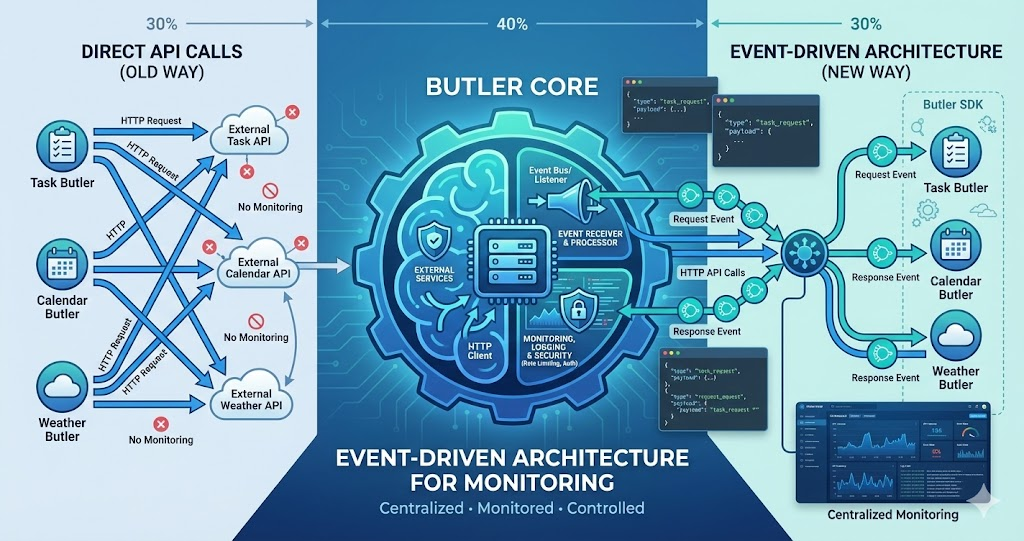
Butlers need to make API calls. They need to fetch data from external services, send requests to third-party APIs, interact with databases, and communicate with other systems. But how should they do it? Direct API calls from each Butler? Or something more centralized?
I’ve been thinking about an event-driven approach: Butlers fire up an event requesting an API call, and the Butler core handles the actual HTTP request. The response comes back as another event. This way, we can monitor all outgoing traffic, implement consistent error handling, add retry logic, rate limiting, and more — all in one place.
The idea: Butlers don’t make API calls directly. They emit events. The Butler core listens, makes the actual HTTP request, and emits a response event. This centralizes monitoring, error handling, and API management — while keeping Butlers simple.
The Problem: Scattered API Calls
In a typical architecture, each Butler would make API calls directly:
Current Approach (Direct API Calls)
Task Butler
Makes direct API calls to task management services
Calendar Butler
Makes direct API calls to calendar services
Weather Butler
Makes direct API calls to weather APIs
This approach has several problems:
No Centralized Monitoring
Each Butler handles its own API calls. There’s no single place to see all outgoing traffic, monitor API health, or track usage patterns.
Inconsistent Error Handling
Each Butler implements its own retry logic, error handling, and timeout management. No consistency, and bugs get duplicated across Butlers.
No Rate Limiting
Without centralized control, it’s hard to implement rate limiting. One Butler might overwhelm an API, affecting others.
Difficult to Add Features
Want to add request logging, caching, or queuing? You’d have to modify every Butler. Centralized features become impossible.
The Solution: Event-Driven API Calls
Instead of Butlers making API calls directly, they emit events. The Butler core listens to these events, makes the actual HTTP request, and emits a response event back to the Butler:
Butler Emits Request Event
Task Butler needs to fetch tasks. Instead of making an HTTP request, it emits an event with the URL, method, headers, and body.
- Butler creates an api.request event with all HTTP details
- Includes a unique request ID for response matching
- Specifies timeout, retry count, and priority
- Butler never touches the network directly
Butler Core Handles Request
Butler core listens for api.request events. It makes the actual HTTP request, applies rate limiting, adds authentication, implements retry logic.
- Applies global rate limiting and request queuing
- Adds authentication headers automatically
- Implements retry logic with exponential backoff
- Logs the request for monitoring and debugging
Response Event Emitted
When the HTTP request completes (success or failure), Butler core emits an api.response event with the response data, status code, and any errors.
- Includes response data, status code, and duration
- Standardizes error formats across all APIs
- Logs the response for monitoring and analytics
- Matches response to original request via ID
Butler Receives Response
Task Butler listens for its response event, processes the data, and continues with its logic. The Butler never touches HTTP directly.
- SDK resolves the awaited promise with response data
- Errors are thrown as typed exceptions
- Butler processes data without knowing about events
- Clean separation between business logic and HTTP
How It Works
Here’s how the event-driven API system would work:
Complete Data Flow
The following diagram shows the complete flow from a Butler mini app making an API request through the core system, including logging:
Complete API Call Flow with Logging
This sequence diagram shows how API requests flow from the Butler mini app through the core system, with logging queued asynchronously and batched to the backend server.
This flow ensures that all API calls go through the core system, enabling centralized monitoring, logging, and control. The logging happens asynchronously via a queue, so it doesn’t block the API response from reaching the Butler mini app.
The Request Event
When a Butler needs to make an API call, it emits a request event:
Request Event Structure
{
  type: "api.request",
  id: "req-123", // Unique request ID
  butler: "task-butler", // Which Butler made the request
  url: "https://api.example.com/tasks",
  method: "GET",
  headers: { "Authorization": "Bearer ..." },
  body: null,
  timeout: 5000,
  retries: 3
}
The Response Event
When the API call completes, Butler core emits a response event:
Response Event Structure
{
  type: "api.response",
  requestId: "req-123", // Matches the request ID
  butler: "task-butler",
  status: 200,
  data: { tasks: [...] },
  error: null,
  duration: 234 // milliseconds
}
The SDK
To make this easy for Butler developers, we’d provide an SDK:
SDK Usage Example
// In Task Butler
import { api } from '@lifebutler/sdk';

// Make an API call
const response = await api.request({
  url: 'https://api.example.com/tasks',
  method: 'GET',
  headers: { 'Authorization': 'Bearer ...' }
});

// SDK handles:
// - Emitting request event
// - Waiting for response event
// - Returning response data
// - Throwing errors on failure
The SDK abstracts away the event system. Butler developers use a simple API interface, but under the hood, everything goes through events.
Benefits of This Approach
Centralized Monitoring
All API calls go through one system. Track usage, latency, errors. Monitor API health in real-time. Debug issues from one place.
Consistent Error Handling
Retry logic in one place. Consistent timeout handling. Standardized error formats. No duplicated error handling code.
Rate Limiting & Throttling
Global rate limiting per API. Prioritize critical requests. Queue requests when needed. Prevent API overload.
Easy Feature Addition
Add caching, request logging, or authentication headers in one place. All Butlers benefit immediately.
Monitoring Capabilities
With all API calls going through Butler core, we can monitor everything:
Request Tracking
Every API request gets a unique ID. Track which Butler made it, when, how long it took, whether it succeeded or failed.
API Health Monitoring
Track success rates, latency, and error rates per API endpoint. Know immediately when an API is down or slow.
Usage Analytics
See which Butlers make the most API calls, which APIs are used most frequently, and peak usage times.
Error Tracking
All API errors go through one system. Track error rates, error types, which APIs fail most often. Debug from a central dashboard.
Implementation Considerations
This is still an idea, but here are some considerations for implementation:
Event System
We’d need a robust event system. Options include:
In-Process Event Bus
If all Butlers run in the same process, a simple in-memory event bus works. Fast, no network overhead, but limited to single-process deployments.
Message Queue
For distributed systems, use a message queue (Redis, RabbitMQ, etc.). More complex but supports multi-process deployments.
Hybrid Approach
Use in-process events for same-process Butlers, message queue for distributed. SDK abstracts away the difference.
Request-Response Matching
The SDK needs to match request events with response events. Each request gets a unique ID, and the SDK waits for the matching response:
SDK Implementation Pattern
// SDK pseudocode
async function request(options) {
  const requestId = generateId();

  // Emit request event
  eventBus.emit('api.request', {
    id: requestId,
    ...options
  });

  // Wait for matching response event
  return new Promise((resolve, reject) => {
    eventBus.once(`api.response.${requestId}`, (response) => {
      if (response.error) {
        reject(response.error);
      } else {
        resolve(response.data);
      }
    });
  });
}
Error Handling
Butler core needs robust error handling:
Retry Logic
Automatically retry failed requests with exponential backoff. Configurable retry count and backoff strategy per API or globally.
Timeout Handling
Set timeouts per request or per API. Emit timeout errors as response events so Butlers can handle them consistently.
Error Formatting
Standardize error formats across all APIs. Network errors, HTTP errors, timeout errors — all formatted consistently for Butler consumption.
The SDK
The SDK makes this easy for Butler developers. They don’t need to know about events — they just use a simple API:
Simple API Interface
Butler developers use a familiar fetch-like API. They don’t need to understand events, request IDs, or response matching.
Type Safety
TypeScript types for request and response data. Type-safe API calls with autocomplete and compile-time checking.
Automatic Features
All centralized features work automatically: retries, timeouts, error handling, logging. No extra code needed.
Butler-Specific Context
SDK automatically includes Butler context in requests: which Butler, version, user context. Better monitoring and debugging.
Use Cases
Here are some scenarios where this approach shines:
API Rate Limiting
A third-party API has a rate limit of 100 requests per minute. Butler core queues requests and ensures we never exceed the limit.
API Key Rotation
Update API keys in Butler core, and all Butlers automatically use the new keys. No need to update every Butler individually.
Request Caching
Add caching logic to Butler core, and all Butlers benefit. Cache frequently-requested data without modifying individual Butlers.
Debugging API Issues
See all requests to a failing API, which Butlers are affected, error rates, latency. Debug from one dashboard.
Potential Challenges
This approach isn’t without challenges:
Event System Complexity
Adding an event system adds complexity. Need to handle event ordering, response matching, and event failures. SDK abstracts most of this.
Latency Overhead
Event-based systems can add latency compared to direct API calls. For most use cases, the overhead is minimal and benefits outweigh cost.
Debugging Event Flows
Debugging can be harder when requests go through events. But centralized logging actually makes debugging easier overall.
SDK Maintenance
The SDK needs to be well-maintained and documented. Good documentation and versioning solve this, like any shared library.
The Constant: Centralized API Management
Every benefit of this architecture stems from one principle: Butlers don’t make API calls — they emit events. Butler core handles the HTTP, and everything flows through one system. Monitoring, error handling, rate limiting, caching, and authentication all become centralized features that every Butler gets automatically. The SDK makes it seamless for developers.
The Vision
The vision is simple: Butlers focus on their logic, not on making HTTP requests. They emit events saying “I need to call this API,” and Butler core handles the rest.
This centralizes all the hard parts: monitoring, error handling, rate limiting, retries, caching. Butler developers get these features automatically through the SDK. And we get full visibility into all API traffic from one place.
Butlers don’t make API calls. They emit events. Butler core handles HTTP, and everyone benefits: simpler Butler code, centralized monitoring, consistent error handling, easy feature addition.
Next Steps
This is still an idea, not a plan. But the concept is clear: an event-driven architecture for API calls, with an SDK that makes it easy for Butler developers.
If we build this, we’d start with:
Basic Event System
Implement a simple event bus for request and response events. Support request-response matching.
Butler Core HTTP Handler
Build the core HTTP handler that listens for request events, makes HTTP calls, and emits response events.
SDK Implementation
Create the SDK that abstracts events away. Simple API interface for Butler developers.
Monitoring & Logging
Add centralized logging and monitoring. Track all API calls, errors, latency. Build dashboards for visibility.
Advanced Features
Add rate limiting, caching, request queuing, retry logic. Build out the centralized features that make this approach powerful.
This is a significant architectural change, but it could make API management much simpler and more powerful. We’ll see if this approach makes sense as we build out more Butlers and encounter more API management challenges.