
The Good Use Case for Vibe Coding: Prototyping and Communication
In our previous post on AI-Augmented Engineering, we made it clear: we never tolerate vibe coding for production code. Every line that ships must be understood, reviewed, tested, and owned by a human engineer. That principle stands.
But there’s a powerful exception: vibe coding is excellent for prototyping and communication. When the goal isn’t shipping production code, but rather demonstrating an idea, bridging a communication gap, or exploring a concept, AI-generated code that you wouldn’t commit becomes a superpower.
The best use case for vibe coding isn’t production software — it’s creating demonstrable prototypes that let people show what they want instead of describing it.
The Communication Problem
Traditional software development has a communication bottleneck. When someone has an idea — whether they’re a product manager, a domain expert, or a backend engineer who doesn’t do UI — they have to describe what they want. That description goes to a UX designer who creates mockups in Figma. Those mockups go to a developer who interprets them into code. Each translation loses information, introduces misunderstandings, and takes time.
The Description Gap
“I want a dashboard that shows metrics” doesn’t convey layout, interactions, or priorities. Words are ambiguous.
The Translation Loss
Each handoff — idea → designer → developer — loses nuance. What you imagined isn’t what gets built.
The Time Cost
Creating Figma mockups takes hours or days. By the time you see something clickable, you’ve already invested significant time and might discover the concept doesn’t work as expected.
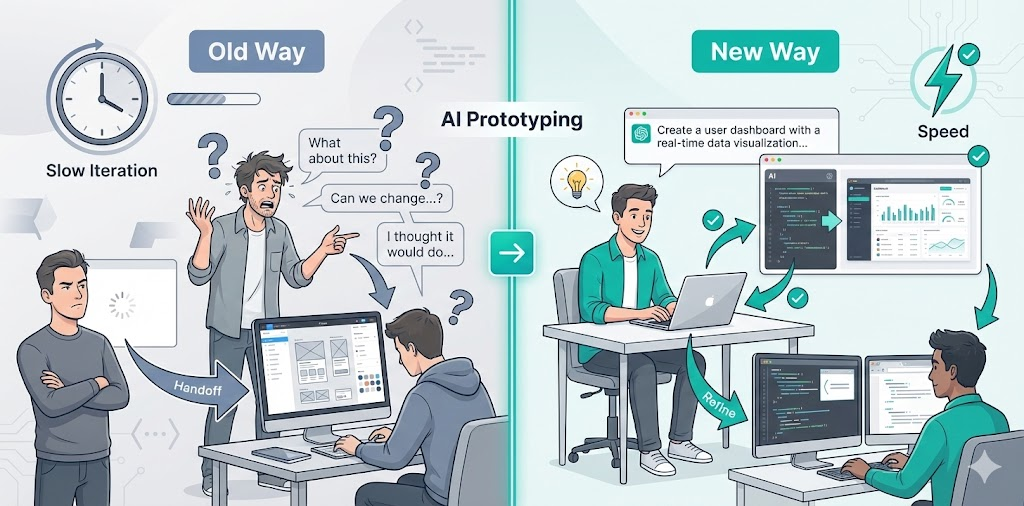
The Old Way: Describe, Mockup, Build
Here’s the traditional flow for bringing an idea to life:
Non-technical person or backend engineer describes the idea
“I want a page that shows investment dividends, with a chart and a list of upcoming payments. Maybe some filters?”
UX designer creates Figma mockup
Designer interprets the description, creates static mockups, adds their own assumptions about layout and interactions. Takes 2-4 hours.
Review and iterate on mockups
Back-and-forth feedback on static images. “Actually, I meant the chart should be bigger” or “That’s not quite what I had in mind.”
Developer implements from mockup
Developer translates static mockup into code, making their own assumptions about interactions, states, and edge cases.
Result: Multiple handoffs, lost nuance, slow iteration
By the time you see something working, days have passed and multiple people have interpreted your idea differently.
The New Way: Vibe Code It
With AI, we can skip the description and mockup steps entirely. Instead:
Person with the idea uses AI to create a working prototype
“Create a React component for a dividend investment dashboard with a chart showing monthly income and a list of upcoming payments.” AI generates working code in minutes.
Show the working prototype to stakeholders
Instead of describing or showing static mockups, you show something that actually works. People can interact with it, click buttons, see how it feels.
Iterate quickly with AI
“Make the chart bigger” or “Add a filter dropdown” — AI updates the code in seconds. You can explore multiple variations rapidly.
Engineer refines prototype into production code
Once the concept is validated, an engineer takes the vibe-coded prototype and rewrites it properly: adds tests, follows patterns, handles edge cases, integrates with real APIs.
Result: Fast iteration, clear communication, validated concepts
Ideas become demonstrable in minutes, not days. Everyone sees the same thing, and concepts are validated before production work begins.
Who Benefits from Vibe Coding
This approach is particularly powerful for two groups:
Technical People Without UI Skills
Backend engineers, DevOps specialists, data scientists — people who can write code but don’t do frontend work. They have ideas for UIs but can’t build them. Instead of describing what they want to a designer or frontend engineer, they can vibe code a prototype and show it.
Example
A backend engineer wants to show how a monitoring dashboard should work. They don’t know React or CSS, but they can describe it to an AI: “Create a dashboard with three metric cards at the top, a time series chart in the middle, and a table of recent events at the bottom.” In 5 minutes, they have a working prototype they can share with the team. The frontend engineer then refines it into production code.
Non-Technical People
Product managers, domain experts, business stakeholders — people who understand the problem but can’t code. They’ve always had to describe ideas and hope designers and developers understand. Now they can create working prototypes themselves.
Example
A product manager wants to demonstrate a new feature concept. They describe it to an AI: “Create a form where users can set up recurring tasks with a calendar picker, frequency selector, and notification preferences.” They get a working prototype they can click through and show to stakeholders. When everyone agrees on the concept, an engineer builds it properly.
The Key Distinction: Prototype vs. Production
The critical thing to understand is the distinction between prototype code and production code:
Vibe-Coded Prototype
- ✓Demonstrates an idea
- ✓Fast to create (minutes)
- ✓Low technical barrier
- ✓Doesn’t need to be perfect
- ✓Can be thrown away
Purpose: Communication and validation
Production Code
- ✓Must be understood and reviewed
- ✓Follows project patterns
- ✓Has tests and error handling
- ✓Handles edge cases
- ✓Owned by an engineer
Purpose: Real software that ships
Vibe coding is perfect for the first category. It’s terrible for the second. The prototype helps everyone understand what to build; the production code is what actually gets built.
The Workflow
Here’s how we use vibe coding in practice:
1. Create the prototype
Someone with an idea uses AI to generate working code. They don’t need to understand React, CSS, or any framework deeply — they just need to describe what they want. The AI creates something that works, even if it’s messy.
2. Share and iterate
The prototype is shared with stakeholders. People can interact with it, provide feedback, and suggest changes. The creator can quickly iterate using AI: “Make the button bigger” or “Add a dark mode toggle.”
3. Validate the concept
Once everyone agrees the concept is right, the prototype has served its purpose. It’s a reference, not a foundation. Everyone understands what needs to be built.
4. Build production code
An engineer takes the validated concept and builds it properly. They might reference the prototype for layout and interactions, but they write the code from scratch following all the principles we outlined in our AI-Augmented Engineering post: understanding, reviewing, testing, and owning every line.
Why This Works
This approach has several advantages over the traditional workflow:
Speed
Prototypes are created in minutes, not hours or days. Ideas become demonstrable immediately.
Clear Communication
Everyone sees the same thing. No ambiguity from descriptions or static mockups.
Low Barrier to Entry
Non-technical people and backend engineers can create prototypes without learning frontend frameworks.
Early Validation
Concepts are validated before production work begins. You discover problems early, when they’re cheap to fix.
Respecting the Boundary
The most important thing is maintaining the boundary between prototype and production:
⚠️ Never commit vibe-coded prototypes to production
Prototypes are for demonstration and communication. They’re not production code. They don’t have tests, don’t follow your patterns, and aren’t understood by anyone. When it’s time to build the real thing, an engineer writes it properly from scratch.
This isn’t about being pedantic — it’s about maintaining code quality and team velocity. Vibe-coded code that makes it into production becomes technical debt. It’s hard to maintain, hard to debug, and hard to extend. The prototype served its purpose; now it’s time to build it right.
Conclusion
Vibe coding has a bad reputation in production contexts, and rightfully so. But when used for its intended purpose — prototyping and communication — it’s incredibly powerful. It lets people show what they want instead of describing it, bridges the gap between technical and non-technical team members, and validates concepts before production work begins.
The key is understanding the distinction: prototypes are for communication, production code is for shipping. Use vibe coding for the first, follow our AI-Augmented Engineering principles for the second.
No more describing ideas to UX designers who create Figma mockups. Just build a working prototype, show it, iterate on it, and then have an engineer build it properly. It’s faster, clearer, and more effective.