
DevOps and Production Support with LLMs: Monitoring, Debugging, and Incident Response
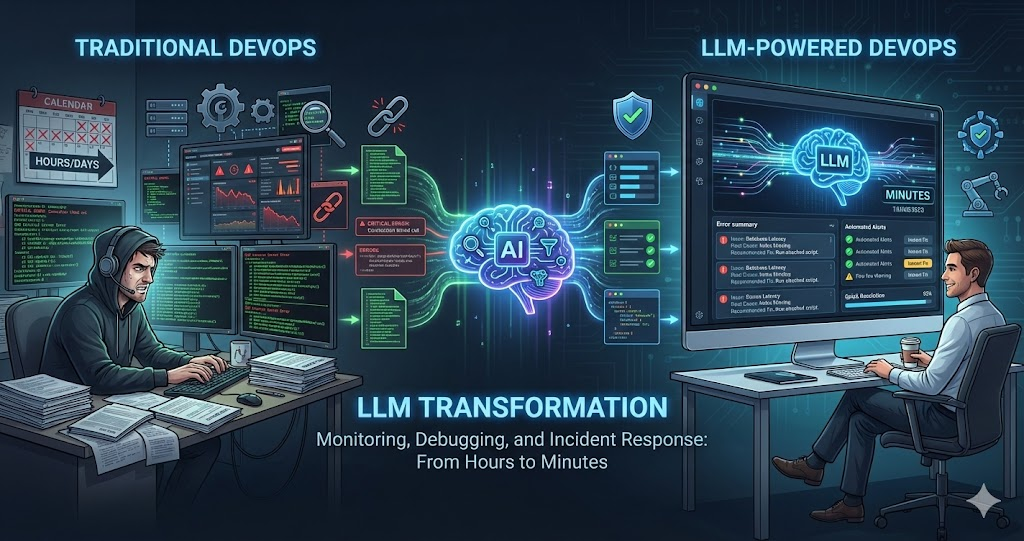
DevOps and production support are perfect use cases for LLMs. LLMs can analyze logs, debug issues, write deployment scripts, respond to incidents, and automate operations — tasks that traditionally require deep expertise and time-consuming manual work.
We’ve integrated LLMs into our DevOps and production support workflows: log analysis, incident response, deployment automation, monitoring, and debugging. LLMs don’t replace DevOps engineers — they amplify their capabilities, making operations faster, more reliable, and less stressful.
LLMs excel at analyzing text — logs, error messages, configuration files, documentation. This makes them perfect for DevOps and production support, where most work involves reading and interpreting text-based information.
Log Analysis with LLMs
One of the most powerful uses: analyzing logs at scale. LLMs can read through thousands of log lines, identify patterns, find errors, and summarize what happened:
Error Identification
Paste logs and ask: “What errors occurred? What caused them? When did they start?” LLMs identify error patterns, trace root causes, and summarize issues from large files.
Pattern Recognition
LLMs spot trends and anomalies that are hard to see manually — unusual spikes, correlations between events, and recurring failure patterns across time ranges.
Log Summarization
Ask LLMs to summarize: “What happened in these logs? What were the key events?” LLMs condense hours of logs into actionable summaries, giving you the signal without the noise.
Example: Analyzing Production Errors
Log Analysis Prompt
"Analyze these production logs:

1. What errors occurred?
2. When did they start?
3. What caused them?
4. Are there any patterns?
5. What's the root cause?
6. What should be done to fix it?

[Paste logs here]"
LLMs can analyze logs, identify errors, trace causes, and suggest fixes — tasks that would take hours manually.
Incident Response with LLMs
When incidents happen, speed is everything. LLMs compress the diagnosis cycle from hours to minutes by rapidly analyzing error signals and suggesting concrete next steps:
Rapid Diagnosis
Paste error messages, logs, and metrics into an LLM. Ask: 'What's wrong? What's the root cause?' LLMs can quickly diagnose issues from error signals.
- Correlates multiple error sources simultaneously
- Identifies root cause vs. symptoms
- Suggests diagnostic commands to confirm hypothesis
Solution Generation
Ask: 'How do I fix this? What are the steps?' LLMs suggest solutions based on error messages, common fixes, and documentation patterns.
- Generates multiple fix options ranked by risk
- Provides specific commands and code changes
- Flags potential side effects of each approach
Runbook Creation
Ask LLM to create runbooks: 'Create a runbook for this incident type.' LLMs document incident response procedures for future reference.
- Step-by-step procedures with decision trees
- Escalation paths and contact information
- Verification checks at each stage
Post-Incident Analysis
After resolution, ask: 'What caused this? What could prevent it? What should improve?' LLMs help with post-mortem analysis and documentation.
- Generates comprehensive post-mortem documents
- Identifies preventive measures and action items
- Suggests monitoring improvements to catch issues earlier
The compounding effect: each incident builds a library of runbooks and post-mortems that LLMs can reference in future incidents, making the team faster over time.
Example: Database Connection Incident
Error Message
“Database connection timeout. Unable to connect to postgresql://...”
LLM Analysis
Suggested: check database status, verify connection pool settings, review connection timeout configuration, check for connection leaks. Provided specific diagnostic commands and fixes.
Result
Identified connection pool exhaustion, fixed configuration. Incident resolved in minutes instead of hours.
Deployment Automation with LLMs
LLMs can write deployment scripts, CI/CD configurations, and infrastructure as code — turning requirements into working configurations:
Script Generation
Ask: “Write a deployment script that builds, tests, deploys to staging, runs smoke tests, and promotes to production with rollback capability.”
CI/CD Configuration
Ask: “Create a GitHub Actions workflow that runs tests on PR, deploys to staging on merge, runs integration tests, then deploys to production.”
Infrastructure as Code
Ask: “Create Terraform/Docker/Kubernetes configs for [requirements].” LLMs generate infrastructure configurations following best practices — security, networking, scaling.
Example: Deployment Script Generation
Deployment Script Prompt
"Write a deployment script that:

1. Builds the application
2. Runs all tests
3. If tests pass, deploys to staging
4. Runs smoke tests on staging
5. If smoke tests pass, deploys to production
6. Includes rollback capability
7. Logs all steps
8. Sends notifications on success/failure
9. Handles errors gracefully

Use bash/shell scripting."
LLMs can generate complete deployment scripts with error handling, logging, and rollback — saving hours of manual script writing.
Monitoring and Alerting with LLMs
LLMs can help set up monitoring, analyze metrics, and configure alerting — transforming raw data into actionable insights:
Metric Analysis
Paste metrics or monitoring data into an LLM. Ask: 'What do these metrics indicate? Are there anomalies?' LLMs interpret metrics and surface issues.
- Identifies performance bottlenecks from metric trends
- Correlates multiple metric sources to find causation
- Highlights anomalies invisible in individual dashboards
Alert Configuration
Ask: 'What alerts should be configured for this service? What thresholds make sense?' LLMs suggest alerting rules based on service characteristics.
- Recommends thresholds based on baseline analysis
- Avoids alert fatigue with smart grouping
- Covers latency, error rates, saturation, and traffic
Dashboard Creation
Ask: 'What metrics should be on a dashboard for this service?' LLMs suggest dashboard configurations and monitoring strategies.
- Organizes dashboards by service golden signals
- Suggests visualization types for each metric
- Includes both high-level and drill-down views
Anomaly Detection
Ask LLM to analyze historical metrics: 'Are there anomalies? What patterns do you see?' LLMs identify unusual patterns in monitoring data.
- Detects gradual degradation before it causes outages
- Identifies seasonal patterns vs. real anomalies
- Suggests proactive actions to prevent incidents
Debugging Production Issues with LLMs
LLMs excel at debugging — they can analyze error messages, trace issues through stack frames, and suggest targeted fixes:
Error Message Analysis
Paste error messages and ask: “What does this mean? What caused it? How do I fix it?” LLMs interpret errors and explain causes.
Stack Trace Analysis
LLMs trace through stack traces, identify where errors originate, map the call chain, and pinpoint the root cause across complex codebases.
Preventive Code Review
Ask LLMs to review code for potential production issues: edge cases, race conditions, missing error handling. Catch bugs before they reach production.
Example: Debugging a Production Bug
Error in Production
Users reporting “payment failed” errors. Logs show: “TypeError: Cannot read property ‘amount’ of undefined.”
LLM Diagnosis
LLM identified: payment object is undefined in some cases. Code doesn’t handle missing payment data. Suggested: add null checks, validate payment data before accessing properties, add error handling.
Fix Applied
Applied LLM-suggested fix: added null checks and validation. Deployed hotfix. Bug diagnosed and fixed in minutes.
Infrastructure Management with LLMs
LLMs can help with infrastructure tasks: configuration, scaling, optimization, and security hardening:
Configuration Generation
Generate Docker/Kubernetes/Terraform configs following best practices and security guidelines from plain requirements.
Scaling Recommendations
LLMs analyze metrics and suggest scaling strategies — whether to scale vertically or horizontally based on usage patterns.
Cost Optimization
Review infrastructure setups and identify unused resources and cost optimization opportunities that are often missed in manual reviews.
Security Hardening
Review infrastructure configs for security issues and hardening gaps — exposed ports, missing encryption, weak access controls.
Documentation and Runbooks with LLMs
Documentation debt kills on-call teams. LLMs can create and maintain documentation, runbooks, and procedures that stay current:
Runbook Creation
Generate comprehensive runbooks from incident descriptions — including steps, checks, decision trees, and recovery procedures.
Documentation Updates
After incidents or changes, ask LLMs to update documentation to reflect changes — keeping docs current with minimal effort.
Procedure Documentation
Create step-by-step procedures from descriptions — including prerequisites, troubleshooting tips, and verification checks at each stage.
Real Scenario: Production Incident Response
Here’s how we used LLMs to respond to a real production incident — API performance degradation detected by monitoring:
Incident Detected
Monitoring alerts: API response times increased from 200ms to 5s. Error rate spiked. Users reporting slow responses.
- Automated alerts triggered by latency threshold breach
- Error rate increased 10x within 5 minutes
- Customer support tickets started arriving
LLM Log Analysis
LLM identified: database query timeouts, connection pool exhaustion, N+1 query pattern in recent code changes.
- Correlated timeout errors with deployment timestamp
- Identified N+1 query pattern as root cause
- Suggested checking connection pool configuration
Diagnosis Confirmed
Checked database connections — pool exhausted. Reviewed recent code changes — found N+1 query issue. Asked LLM for fix.
- Connection pool metrics confirmed LLM hypothesis
- Git blame traced to specific commit 3 hours prior
- LLM generated eager loading fix with batch queries
Fix Deployed & Verified
Applied LLM-suggested fix: eager loading, batch queries, database indexes. Deployed hotfix. Response times returned to normal.
- Hotfix deployed within 15 minutes of diagnosis
- Metrics returned to baseline within 5 minutes
- LLM generated post-mortem document automatically
Total resolution time: 30 minutes instead of hours. LLMs helped with diagnosis, fix generation, and post-incident documentation — compressing the entire incident lifecycle.
The Constant: LLMs for Analysis, Humans for Execution
Every benefit of LLMs in DevOps stems from one principle: use LLMs to analyze, diagnose, and suggest — but always have humans review and execute. LLMs don’t replace DevOps engineers. They amplify them — turning hours of log analysis into seconds, generating runbooks from incidents, and providing diagnostic context that makes every on-call engineer more effective.
Best Practices for DevOps with LLMs
Provide Context
When asking LLMs for help, provide logs, error messages, configuration, and recent changes. More context leads to better analysis.
Verify Suggestions
Don’t blindly execute LLM suggestions. Review them, understand them, verify they’re safe. LLMs can suggest incorrect or dangerous commands.
Analysis, Not Execution
Use LLMs to analyze, diagnose, and suggest. Execute commands yourself after review. Don’t give LLMs direct access to production systems.
Document Everything
Document incidents, fixes, and procedures. LLMs can help create documentation, but ensure it’s accurate and complete.
Limitations and Considerations
LLMs are powerful for DevOps, but understanding the boundaries is critical for safe operations:
No Production Access
Never give LLMs direct access to production systems. Use them for analysis and suggestions, but execute commands yourself after review.
Verify All Suggestions
LLMs can suggest incorrect or dangerous commands. Always review and verify. Understand what commands do before executing.
Expertise Still Required
LLMs amplify DevOps engineers, not replace them. Complex issues, architecture decisions, and critical incidents require human expertise.
Protect Sensitive Data
Don’t paste secrets, passwords, or user data into LLMs. Sanitize logs and error messages before sharing. Be mindful of data privacy.
Conclusion
LLMs transform DevOps and production support by making operations faster, more reliable, and less stressful. They excel at analyzing logs, debugging issues, writing scripts, and responding to incidents — tasks that traditionally require deep expertise and time-consuming manual work.
The key is using LLMs intentionally: provide context, verify suggestions, use them for analysis not execution, and document everything. LLMs don’t replace DevOps engineers — they amplify their capabilities.
LLMs excel at analyzing text — logs, error messages, configuration files. Use them to amplify your DevOps capabilities, not replace them. The combination of human expertise and LLM assistance creates a powerful operational workflow.
If you’re doing DevOps or production support, try using LLMs for log analysis, incident response, debugging, and documentation. You might find that they make your work faster, more reliable, and less stressful — especially during incidents when speed matters most.