
Butlers for Kids: A Separate App for Children and Parents
Life Butler works great for adults managing their own lives. But what about kids? What if parents could add tasks to their children and monitor what they did — all through a simpler, less overwhelming interface designed specifically for young minds?
I’ve been thinking about building a separate app just for this. Not a simplified version of Life Butler, but something built from the ground up with children in mind. An app where kids feel empowered, not overwhelmed. Where parents can guide and monitor, but kids can still feel ownership over their tasks.
Kids need to be managed by their parent, but they also need to feel like they’re in control. The app should be colored and laid out differently — simpler, less overwhelming, designed for how children actually think and interact.
The Core Idea
Imagine a parent opens their Life Butler app and sees a section for their children. They can add tasks like “Finish math homework” or “Put away toys” or “Practice piano for 20 minutes.” The parent sets the task, maybe adds a due time, and assigns it to their child.
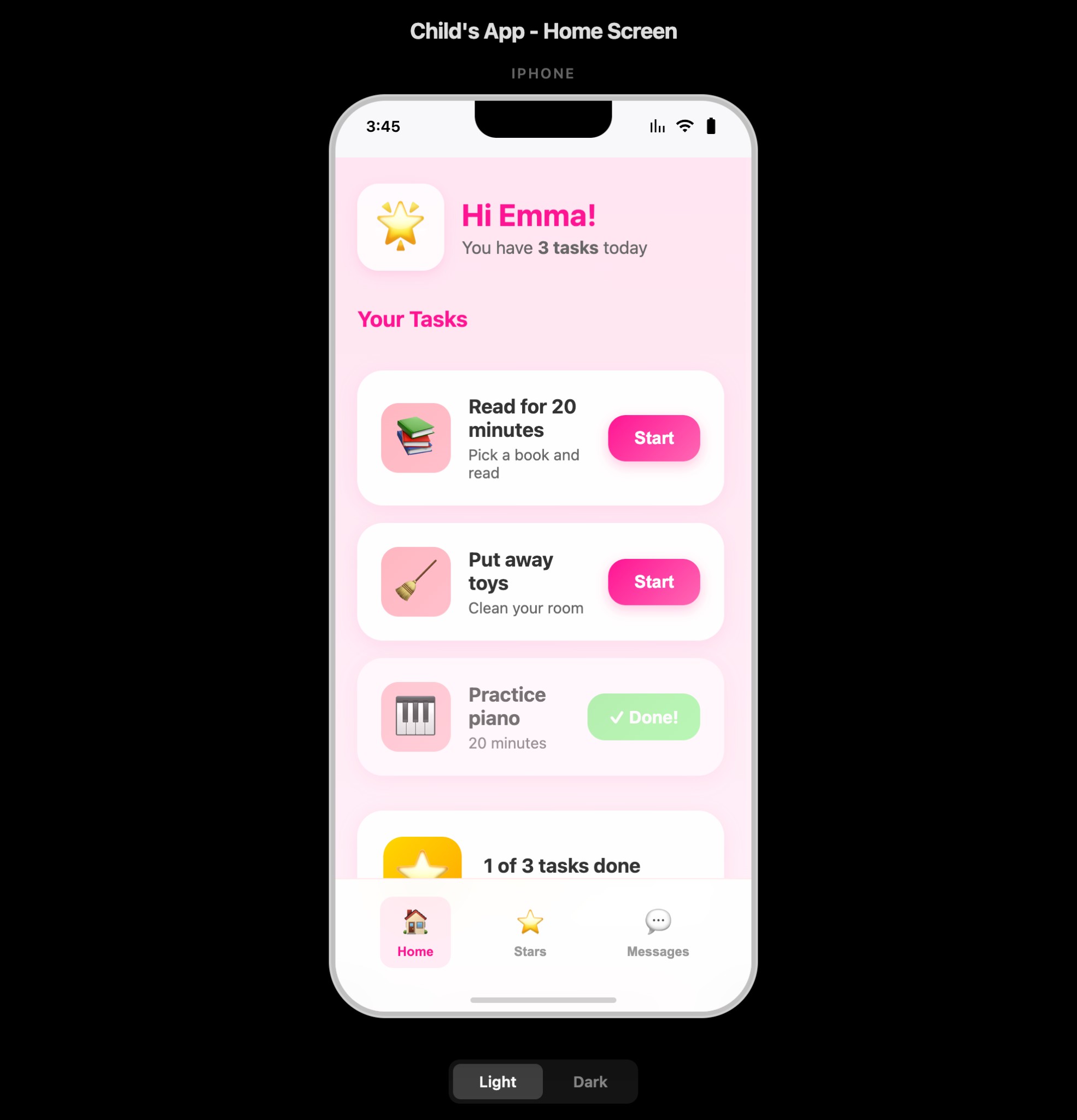
The child opens their own app — a completely separate interface designed just for them. It’s colorful, simple, and fun. Tasks appear as cards or characters or something playful. When they complete a task, they mark it done, maybe take a photo or add a note, and the parent gets notified. The parent can see progress, celebrate wins, and help when needed.
Why a Separate App?
This isn’t just Life Butler with a “kids mode.” It’s a fundamentally different experience because children have fundamentally different needs:
Visual Simplicity
Kids don’t need complex dashboards. They need one clear screen with their tasks, big buttons, and immediate feedback.
Color and Personality
The app should feel playful and engaging. Bright colors, friendly characters, themes the child can choose. Their space.
Reduced Cognitive Load
One task at a time, clear instructions, simple actions. The interface should guide them, not confuse them.
Parent Control, Child Agency
Parents manage what tasks exist. Kids control how they complete them. The balance matters.
The Parent Experience
In the parent’s Life Butler app, they see a new section: “Kids” or “Family.” Here, they can:
Add Tasks
Create tasks for their child: homework, chores, practice sessions, reading time. Set due dates, add descriptions, attach photos or instructions.
- Set due dates and times for each task
- Add descriptions, photos, or instructions
- Assign tasks to specific children
- Create recurring tasks for routines
Monitor Progress
See what tasks are pending, in progress, or completed. View completion history, photos or notes the child added when they finished.
- Real-time task status updates
- View child-added photos and notes
- Track completion streaks and patterns
- See time spent on each task
Provide Support
Send encouragement, adjust deadlines, help break down big tasks into smaller steps. The parent is the guide, not just a task assigner.
- Send messages of encouragement
- Adjust deadlines when needed
- Break complex tasks into smaller steps
- Help when the child gets stuck
Celebrate Wins
Acknowledge completed tasks, add rewards or recognition. Build positive reinforcement into the system.
- Acknowledge task completions
- Add rewards or recognition badges
- Build positive reinforcement habits
- Share progress with the family
The Child Experience
The child’s app is where the magic happens. It needs to feel different — simpler, more engaging, less like work:
One Screen, Clear Focus
When the child opens the app, they see their tasks for today. No tabs, no complex navigation. Just: here’s what you need to do.
Visual Feedback
Completing a task triggers animations, sounds, or visual rewards. Make it feel like progress, not just checking boxes.
Simple Actions
Big, clear buttons. “Start” to begin a task, “Done” to finish it. Maybe “Need Help” to signal to the parent.
Ownership and Choice
Kids can choose which task to tackle first. They can add notes or photos. It’s their space, even if parents manage it.
Design Principles
Building an app for kids requires different design principles than an app for adults:
Visual Design
Bright, Playful Colors
Colors that feel fun and engaging. Let kids choose their theme. Avoid the muted, professional palette of adult apps.
Large, Clear Typography
Big text that’s easy to read. Simple language. No jargon. Everything should be immediately understandable.
Generous Spacing
More white space, bigger touch targets, less information density. Kids need room to process.
Playful Elements
Characters, icons, or visual metaphors. Tasks as animals, stars, or characters. Make it feel like a game, not a chore list.
Interaction Design
Immediate Feedback
Every action should have clear, immediate feedback. Tap a button? See it respond. Complete a task? See it celebrate.
Minimal Steps
Completing a task should be one or two taps. No multi-step forms, no complex flows. Simple, direct actions.
Error Prevention
Design to prevent mistakes rather than requiring kids to fix them. Clear labels, obvious actions, confirmation for important steps.
Avoiding Overwhelm
The biggest risk with a kids’ task app is making it feel like work or creating anxiety. Here’s how to avoid that:
Limit Visible Tasks
Show only today’s tasks, or maybe 3–5 tasks at a time. Don’t overwhelm with a long list. Let kids focus on what’s immediate.
No Urgency Pressure
Avoid red alerts, countdown timers, or aggressive notifications. Show due times gently, but don’t create stress. The parent can handle urgency management.
Positive Framing
Frame tasks positively: “You can practice piano” not “You must practice piano.” Celebrate completions more prominently than pending tasks.
Break Down Big Tasks
Parents can break complex tasks into smaller steps. “Clean your room” becomes “Put away toys,” “Make your bed,” and “Organize your desk.”
Allow Flexibility
Kids can choose which task to do first. They can pause and resume. They can ask for help. It shouldn’t feel rigid or controlling.
The Parent-Child Connection
The app should facilitate connection, not just task management:
Two-Way Communication
Kids can send messages or requests for help. Parents can send encouragement. A communication tool, not just a task list.
Shared Celebrations
When a child completes a task, both parent and child see it. Parent gets notified and can respond with encouragement.
Progress Visibility
Kids can see their progress over time — streaks, completed tasks this week. Parents can see the same and celebrate together.
Respectful Boundaries
Parents can’t micromanage every moment. Tasks have due times, but kids control when and how they complete them.
Technical Considerations
Building a separate app means some technical decisions:
Separate App, Shared Backend
The kids’ app would be a separate application — maybe a React Native app or a simplified web app. But it would share the same backend as Life Butler, with a parent-child relationship model:
Data Model
Parent Account: Manages child accounts, creates tasks, monitors progress
Child Account: Views tasks, marks completion, adds notes/photos, communicates with parent
Tasks: Created by parent, assigned to child, with due dates, descriptions, and completion status
Activity Log: Tracks completions, timestamps, notes, photos — visible to both parent and child
Privacy and Safety
A kids’ app requires extra attention to privacy and safety:
COPPA Compliance
Follow Children’s Online Privacy Protection Act requirements. Parental consent, limited data collection, clear privacy policies.
Parental Controls
Parents control what data is collected, who can communicate with their child, and what features are available.
Secure Communication
All communication between parent and child is encrypted and monitored. No external messaging or unapproved contacts.
Age Considerations
A 6-year-old needs a different interface than a 12-year-old. The app could adapt based on age:
Ages 5–8
Very visual, icon-based interface. Minimal text, lots of pictures. Simple tap-to-complete actions. Character-based task representation. Parent reads descriptions aloud.
Ages 9–12
More text, but still simple language. Card-based task layout. Can add notes and photos. More autonomy in task management. Progress tracking and streaks.
The Constant: Child-First Design
Every design decision comes back to one principle: the child’s experience comes first. Simple interfaces, playful interactions, zero overwhelm. Parents manage tasks, but the app is the child’s space — colorful, engaging, and empowering. Not a simplified adult tool, but something built from the ground up for how children think and interact.
The Vision
Imagine a 7-year-old opens their tablet and sees their “Butler App.” It’s colorful, friendly, and shows three tasks for today: a picture of a book (reading time), a picture of toys (clean up), and a picture of a piano (practice). They tap on the book, see a simple description, and tap “Start.” When they’re done, they tap “Done” and maybe take a photo of the book they read. A little celebration animation plays.
Meanwhile, the parent gets a notification: “Emma finished reading time!” They can see the photo, send a message of encouragement, and celebrate together.
It doesn’t feel like work. It doesn’t feel overwhelming. It feels like a game, a helper, a friend. But it’s actually teaching responsibility, time management, and task completion in a way that feels natural and positive.
Why This Matters
Task management apps for kids exist, but most feel like simplified versions of adult apps. They’re functional but not engaging. They manage tasks but don’t build habits. They track completion but don’t foster connection.
A separate app built specifically for kids — with their cognitive development, attention spans, and need for engagement in mind — could be different. It could make task management feel like empowerment, not obligation. It could help parents guide without micromanaging. It could build life skills in a way that feels natural and positive.
And by building it as a separate app, we can optimize every pixel, every interaction, every feature for children. No compromises. No “adult mode” bleeding through. Just a clean, simple, engaging experience designed specifically for how kids think and interact.
Next Steps
This is still an idea, not a plan. But the vision is clear: a separate app for kids, connected to Life Butler for parents, designed from the ground up to be simple, engaging, and empowering. Not overwhelming. Not stressful. Just helpful.
If you’re a parent thinking about task management for your kids, or if you have ideas about what would make this work better, I’d love to hear from you. This feels like something worth building — but only if it’s built right, with kids’ needs at the center.
Kids deserve tools designed for them, not simplified versions of adult tools. They deserve interfaces that respect their cognitive development, their need for play, and their growing autonomy. A separate app built just for them could be that tool.