
How We Do QA With LLMs: From Concept to User Acceptance
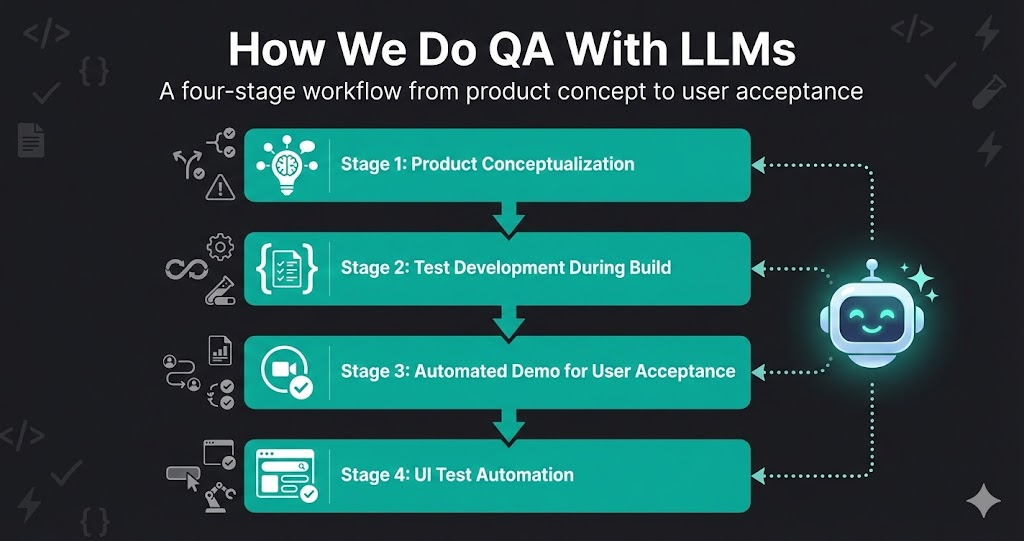
Quality assurance isn’t something that happens after development — it’s woven into every stage of building Life Butler. And LLMs have transformed how we approach QA, from the earliest product discussions to final user acceptance testing.
The key insight? Start thinking about quality at the product level, not just the code level. Use LLMs to anticipate problems before they exist, automate tests as features are being built, and create automated demos that validate the entire user experience.
Here’s our complete QA workflow, from concept to user acceptance.
The Four-Stage QA Workflow
Product Conceptualization
Use LLMs to anticipate use cases, edge cases, and potential flaws in the flow before a single line of code is written.
- •Describe the feature or product concept to the LLM
- •Ask it to identify all possible use cases and user journeys
- •Request analysis of edge cases and failure modes
- •Have it identify potential flaws in the user flow
- •Document everything as you go — the LLM helps structure it
Test Development During Build
While developers are working on the product, start writing test cases and automate what you can on the dev environment.
- •Write test cases based on the conceptualization phase
- •Automate tests that can run on fresh but unstable dev builds
- •Set up CI/CD pipelines to run tests automatically
- •Use LLMs to generate test data and edge case scenarios
- •Catch issues early, before they reach staging or production
Automated Demo for User Acceptance
Run automated demos that walk through the entire user journey, validating the experience end-to-end.
- •Create automated demo scripts that simulate real user interactions
- •Run demos on staging environments before user acceptance testing
- •Generate demo reports showing what works and what doesn't
- •Use LLMs to create natural-language summaries of test results
- •Validate the complete user experience, not just individual features
UI Test Automation
Write UI test code with LLMs — anyone can automate things now, not just QA engineers.
- •Use LLMs to generate UI test code from descriptions or screenshots
- •Create tests for complex user flows that would be tedious to write manually
- •Maintain and update tests as the UI evolves
- •Generate test reports and documentation automatically
- •Enable developers and product managers to write tests too
The Constant: LLMs at Every Stage
Throughout every stage of this workflow, an LLM is at our side. It’s not just writing test code — it’s helping us think about what could go wrong, generating edge cases we’d miss, creating realistic test data, and summarizing results into actionable reports. The LLM is the tireless QA partner that makes this whole approach scale.
Stage 1: Product Conceptualization
Most bugs aren’t coding errors — they’re design flaws that weren’t caught early enough. That’s why we start QA at the product conceptualization level, using LLMs to think through problems before they become code.
What We Do
Use Case Identification
Describe the feature to the LLM and ask: “What are all the ways users might interact with this?” It generates comprehensive use cases you might not have considered.
Edge Case Analysis
Ask the LLM to identify edge cases: “What happens if the user does X while Y is happening?” It thinks through scenarios you might miss.
Flow Flaw Detection
Have the LLM analyze the user flow for potential flaws: “Where could users get confused?” or “What steps are missing?”
Documentation as You Go
The LLM helps structure and document everything: use cases, edge cases, potential issues, and mitigation strategies. This becomes your test plan.
Why This Works
LLMs excel at pattern matching and thinking through scenarios systematically. They can consider hundreds of use cases and edge cases that would take a human hours to enumerate. By doing this upfront, we catch design flaws before they become bugs, saving time and preventing user-facing issues.
Real Example
When designing a payment flow, we asked the LLM to identify all possible failure modes. It identified 15 edge cases we hadn’t considered — including what happens if a user closes the browser mid-payment and returns later. We designed the flow to handle this before writing any code.
Stage 2: Test Development During Build
While developers are building features, we’re writing tests. Not after — during. This parallel work means tests are ready as soon as features are, and we catch issues in the dev environment before they reach staging.
The Process
Write Test Cases from Conceptualization
Use the use cases and edge cases identified in Stage 1 to write comprehensive test cases. The LLM helps convert conceptual scenarios into executable test steps.
Automate What You Can
Use LLMs to generate test automation code. Start with API tests, then move to integration tests. Automate tests that can run on unstable dev builds without breaking the build process.
Run Tests on Dev Environment
Set up CI/CD to run automated tests on every dev build. Catch regressions immediately. Use LLMs to analyze test failures and identify root causes quickly.
Generate Test Data
Use LLMs to generate realistic test data for edge cases. Create scenarios that would be difficult to set up manually, like “user with 10,000 transactions” or “account with special characters in the name.”
Benefits
- Early Detection: Catch bugs in dev, not production
- Parallel Work: Tests are ready when features are
- Continuous Feedback: Developers get immediate feedback on their changes
- Reduced Rework: Fix issues before they compound
Stage 3: Automated Demo for User Acceptance
User acceptance testing doesn’t have to be manual. We create automated demos that walk through complete user journeys, validating the entire experience end-to-end.
What Automated Demos Do
Complete User Journeys
Automated demos simulate real user interactions from start to finish: sign up → onboarding → use feature → complete task. The full experience, not just individual features.
Comprehensive Reports
Demos generate detailed reports: what worked, what failed, where users might get stuck. LLMs create natural-language summaries that are easy to understand.
Pre-UAT Validation
Run automated demos on staging before real user acceptance testing. Fix obvious issues before users see them. Validate the experience matches the product vision.
Repeatable and Consistent
Automated demos run the same way every time. No human error, no forgotten steps, no inconsistent results. Perfect for regression testing.
How We Build Automated Demos
We use LLMs to help write demo scripts. Describe the user journey, and the LLM generates the automation code. It can handle complex flows, conditional logic, and error handling. The result is a demo that validates the entire user experience, not just individual components.
Example Demo Flow
1. User Registration
✅ Fill signup form → Verify email → Complete profile
2. First Feature Use
✅ Navigate to feature → Complete tutorial → Create first item
3. Complete Task Flow
✅ Start task → Add details → Complete → Verify result
Report Generated
LLM generates natural-language summary: “User journey completed successfully. All steps executed as expected. No errors encountered. Experience matches product vision.”
Stage 4: UI Test Automation
The biggest change LLMs have brought to QA? Anyone can write UI tests now. You don’t need to be a QA engineer or know Selenium inside and out. Describe what you want to test, and the LLM generates the test code.
How It Works
Describe or Screenshot
Tell the LLM what you want to test, or provide a screenshot and ask it to write tests for the UI elements it sees. Natural language in, test code out.
LLM Generates Test Code
The LLM generates complete test code in your preferred framework (Playwright, Cypress, etc.). Setup, test steps, assertions, and cleanup included.
Maintain and Update
When the UI changes, describe the changes and the LLM updates the test code. No need to manually find and fix selectors.
Democratized Testing
Developers, product managers, and designers can all write tests now. Describe what to test, LLM generates the code. Test coverage dramatically increases.
Real Example
Test Request
“Write a Playwright test that verifies the payment flow: user fills out payment form, clicks submit, sees confirmation page, and receives email confirmation. Include error handling for invalid card numbers.”
Result: LLM generates complete Playwright test with form filling, button clicks, page navigation, email verification, and error case handling. Test is ready to run in 30 seconds.
The Complete Workflow in Practice
Here’s how all four stages work together in a typical feature development cycle:
Product Conceptualization
Feature is discussed. LLM helps identify use cases, edge cases, and potential flaws. Everything is documented. This becomes the test plan.
Development Begins
Developers start building. QA writes test cases and automates tests based on conceptualization. Tests run on dev environment. Issues caught early.
Feature Complete
Feature reaches staging. Automated demo runs complete user journey. Report generated. Issues identified and fixed before user acceptance testing.
UI Tests Written
UI test code written with LLM assistance. Anyone on the team can contribute tests. Tests cover happy paths, edge cases, and error scenarios. Comprehensive coverage achieved.
Throughout All Stages:
LLMs are active at every step — anticipating problems, generating test cases, creating demo scripts, writing UI test code, and summarizing results into actionable reports.
Key Principles
Start Early, Think Broadly
Don’t wait until code is written to think about quality. Start at the product level. Use LLMs to anticipate problems before they exist.
Test in Parallel, Not After
Write tests while features are being built. Run them on dev environments. Catch issues before they compound.
Validate the Experience, Not Just Features
Automated demos validate complete user journeys, not just individual features. This catches integration issues and UX problems.
Democratize Test Writing
With LLMs, anyone can write tests. Developers, product managers, designers — they all describe what they want to test, and the LLM generates the code.
Document as You Go
Use LLMs to help structure and document everything: use cases, test cases, test results, and bug reports. This creates institutional knowledge.
Benefits of This Approach
For Quality
- +Catch design flaws before implementation
- +Find bugs in dev, not production
- +Comprehensive test coverage
- +Validate complete user experiences
For Speed
- +Tests ready when features are
- +Faster test writing with LLMs
- +Automated demos save manual time
- +Less rework, more shipping
Conclusion
QA with LLMs isn’t about replacing QA engineers — it’s about amplifying their impact and democratizing quality. By starting QA at the product conceptualization level, testing in parallel with development, and using LLMs to automate test writing, we catch more issues earlier and validate complete user experiences.
The key is to think about quality from the very beginning, not as an afterthought. Use LLMs to anticipate problems, write tests, and validate experiences. The result is higher quality software, shipped faster, with fewer bugs reaching users.
Try it on your next feature. Start with product conceptualization, use LLMs to think through use cases and edge cases, and write tests as you build. You might be surprised how much quality improves when you think about it from day one.