
Building Life Butler With Minimal AI Costs: A $40/Month Strategy
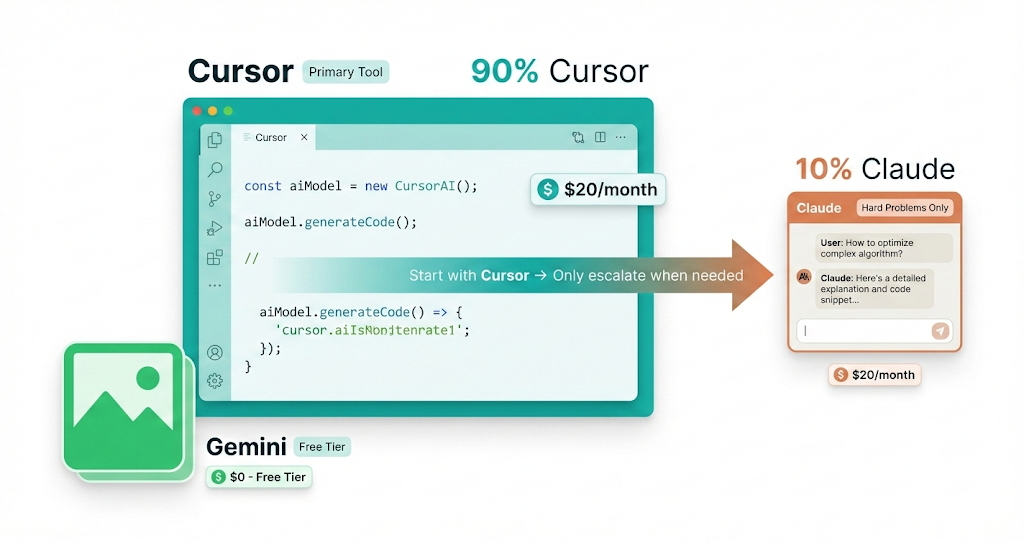
When I started building Life Butler, I made a decision: I wasn’t going to let AI subscription costs spiral out of control. I’d seen stories of developers spending hundreds of dollars per month on ChatGPT Plus, Claude Pro, and various AI tools. That wasn’t sustainable for a solo founder.
So I developed a strategy that keeps my monthly AI costs at $40 total — while still leveraging AI effectively to build a complex product. Here’s exactly how I do it, what tools I use, and the workflow that makes it work.
The $40/Month Breakdown
$20/month — Cursor Pro
This is my primary AI coding tool. Cursor’s Composer model is practically unlimited for most tasks. I use it for 90% of my coding — scaffolding, refactoring, debugging, writing tests, and generating boilerplate. The Composer model is fast, context-aware, and handles most development tasks without hitting limits.
$20/month — Claude (Anthropic) or Opus in Cursor
I only use Claude for the hardest problems — complex architectural decisions, tricky debugging sessions, or when I need deep reasoning about system design. This is my “expensive model” that I use sparingly. When Cursor’s Composer hits its limits or I need more sophisticated reasoning, I switch to Claude. I also use Opus models in Cursor for similar situations.
$0/month — Gemini (Nano Banana Pro)
For image generation, I use Gemini’s free tier (Nano Banana Pro). It handles all my logo generation, product mockups, and blog images. The quality is excellent for my needs, and it’s completely free. This saves me from paying for DALL-E, Midjourney, or other image generation services.
The Strategy: Always Start Cheap
The key to keeping costs low is a simple rule: always start with the cheapest option. Here’s my workflow:
The Cost-Effective AI Workflow
Step 1: Try Cursor Composer First
Start every task with Cursor’s Composer model. It’s included in the $20 subscription and handles most coding tasks.
Step 2: Let Cursor Create Prompts
If Composer isn’t enough, ask Cursor to help you write a better prompt before switching to Claude. Often, a better prompt makes Composer sufficient.
Step 3: Only Then Use Claude/Opus
Reserve expensive models for genuinely hard problems: complex architecture, deep debugging, or tasks that require sophisticated reasoning.
Planning Before Coding
One of the biggest cost-savers is planning before coding. I spend time thinking through the problem, sketching out the solution, and writing clear specifications before I ever ask an AI to generate code.
A well-planned feature takes one AI conversation. A poorly-planned feature takes five conversations, multiple rewrites, and burns through expensive model credits.
Here’s what I do before writing any code:
Define the problem clearly: What exactly am I trying to build? What are the constraints? What edge cases need handling?
Sketch the architecture: How will the pieces fit together? What APIs are involved? What data structures make sense?
Write a clear spec: When I finally ask the AI to generate code, I give it a detailed specification. This means the AI gets it right the first time, instead of requiring multiple iterations.
This planning phase happens entirely in my head or on paper — no AI credits spent. But it saves me dozens of expensive AI conversations later.
Reserve Expensive Models for Hard Problems
I have a simple rule: only use Claude or Opus for problems I genuinely can’t solve with Cursor Composer. Here’s what qualifies:
Use Cursor Composer For
- ✓Writing functions and components
- ✓Refactoring and code cleanup
- ✓Writing tests and documentation
- ✓Debugging straightforward issues
- ✓Generating boilerplate code
- ✓Most day-to-day development tasks
Reserve Claude/Opus For
- ⚡Complex architectural decisions
- ⚡Deep debugging of subtle bugs
- ⚡Problems requiring multi-step reasoning
- ⚡Design pattern selection
- ⚡Security and performance optimization
- ⚡When Composer clearly isn’t sufficient
A Real Example: Building the Socials Butler
Let me walk through how I built the Socials Butler product and developer pages using this strategy:
Step 1: Planning (0 AI credits)
I thought through what the Socials Butler should do: family connections, messaging, relationship tracking. I sketched out the structure and features mentally before opening any AI tool.
Step 2: Cursor Composer ($0 — included)
I used Cursor Composer to generate the product page structure, following the pattern of existing butler pages. Composer handled the entire page generation — HTML structure, content sections, and styling — in one conversation.
Step 3: Cursor Composer Again ($0 — included)
For the developer page, I asked Cursor to create a similar structure but focused on API integration. Composer generated the entire page following the developer page pattern from other butlers.
Step 4: Gemini for Logo ($0 — free tier)
I used Gemini (Nano Banana Pro) to generate the logo. I let Cursor Composer help me write a good prompt first, then used that prompt in Gemini. The logo generation was completely free.
Total Cost: $0
The entire Socials Butler feature — product page, developer page, and logo — was built using only tools included in my $20 Cursor subscription and free Gemini tier. No Claude credits used.
When I Actually Use Claude
I do use Claude, but sparingly. Here are real examples of when I’ve needed it:
Complex Architecture Decision
When designing the Money Butler transaction layer, I needed to think through how multiple finance Butlers would read and write to the same data. This required reasoning about data consistency, transaction isolation, and API design. Claude helped me explore different architectural patterns and their trade-offs.
Subtle Bug Debugging
When I had a race condition in the task aggregation system that only appeared under specific load conditions, Cursor Composer couldn’t reason through the concurrency issues. Claude helped me trace through the execution flow and identify the root cause.
Security Review
Before implementing the Socials Butler messaging API, I used Claude to review the security implications: encryption, permission scoping, and potential attack vectors. This required deep reasoning about security patterns that Composer wasn’t sophisticated enough for.
Let Cursor Write Better Prompts
One of my favorite cost-saving techniques: let Cursor help you write better prompts before switching to expensive models.
When Cursor Composer isn’t giving me what I need, I don’t immediately switch to Claude. Instead, I ask Cursor: “Help me write a better prompt for this task.” Often, Cursor will suggest a more specific, clearer prompt that makes Composer sufficient. This saves me from using expensive models unnecessarily.
A well-crafted prompt is worth more than a more expensive model. Spend time on the prompt, not money on the model.
Tracking Costs
I don’t obsessively track every API call, but I do keep a mental note of my usage patterns. Here’s what a typical month looks like:
Typical Monthly Usage
Key Principles
If you want to build with minimal AI costs, here are the principles that guide my approach:
1Always start with the cheapest option
Try Cursor Composer first. Only escalate to expensive models when Composer genuinely can’t handle the task. Most coding tasks don’t need Claude-level reasoning.
2Plan before you prompt
Spend time thinking through the problem before asking AI to solve it. A well-planned feature requires one AI conversation. A poorly-planned feature requires five conversations and burns through credits.
3Let AI improve your prompts
Before switching to an expensive model, ask Cursor to help you write a better prompt. Often, a clearer prompt makes the cheaper model sufficient.
4Reserve expensive models for hard problems
Only use Claude or Opus for genuinely difficult tasks: complex architecture, deep debugging, or problems requiring sophisticated reasoning. Everything else should use Cursor Composer.
5Use free tools when possible
Gemini’s free tier handles all my image generation needs. Don’t pay for image generation when free options work well. Same principle applies to other tools — always check if there’s a free tier that meets your needs.
The Bottom Line
Building Life Butler with $40/month in AI costs isn’t about being cheap — it’s about being strategic. I’m not avoiding AI; I’m using it efficiently. By maximizing free tools, planning before coding, and reserving expensive models for genuinely hard problems, I get all the benefits of AI-assisted development without the cost spiral.
The key insight: most coding tasks don’t need the most expensive AI model. Cursor Composer handles 90% of development work perfectly well. Save the expensive models for the 10% that actually need them.
If you’re building a product and worried about AI costs spiraling, try this approach. Start with Cursor, plan your features, write clear prompts, and only escalate when necessary. You might be surprised how far $40/month can take you.